
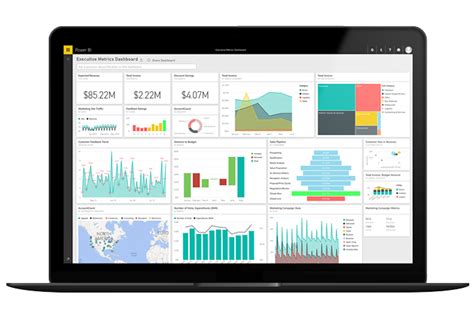
Business intelligence applications help organizations collect, manage, analyze, and interpret data to make informed decisions. These applications act as the backbone of any company’s data-driven decision-making process.
With a plethora of Business Intelligence (BI) applications in the market, it can be challenging to find the right one that fits your organization’s needs. This article lists the top 10 business intelligence applications for businesses of all sizes and industries.
1. Microsoft Power BI
Microsoft Power BI is a cloud-based BI tool that integrates with other Microsoft platforms like Excel, SQL Server, SharePoint, and more. It allows users to visualize data and share insights across the organization in just a few clicks. It provides an intuitive user interface for users to create reports, interactive dashboards, and real-time data analytics.
Some of Microsoft Power BI’s key features include data visualization, drag-and-drop report designing, AI-powered insights, collaboration, and security.
2. Tableau
Tableau is a data visualization and business intelligence tool that helps businesses see and understand their data. It allows users to connect and blend data from multiple sources, create visualizations, and share insights with colleagues.
Tableau’s features include interactive dashboards, ad-hoc analysis, collaboration, and an extensive library of pre-built data connectors.
3. QlikView
QlikView is a data discovery and visualization tool that helps businesses make informed decisions. It enables users to analyze data from multiple sources, create custom dashboards, and share insights across the organization.
QlikView’s features include a self-service interface, drag-and-drop functionality, real-time data analytics, and collaboration tools.
4. SAP BusinessObjects
SAP BusinessObjects is a business intelligence suite that helps organizations gain a better understanding of their data. It provides tools for reporting, analysis, and visualization of data from various sources, including databases, Excel spreadsheets, and cloud-based systems.
SAP BusinessObjects’ key features include ad-hoc reporting, analytics, data visualization, and data governance.
5. MicroStrategy
MicroStrategy is a cloud-based business intelligence platform that enables users to analyze and visualize data from multiple sources easily. It offers a suite of analytical tools, including data discovery, interactive dashboards, and predictive analytics.
MicroStrategy’s features include self-service data discovery, a mobile app, real-time analytics, and collaboration tools.
6. IBM Cognos Analytics
IBM Cognos Analytics is a business intelligence platform that provides a unified workspace for analytics and reporting. It enables users to create interactive reports, dashboards, and visualizations from multiple sources, including databases, spreadsheets, and cloud-based systems.
IBM Cognos Analytics’ key features include self-service analytics, real-time data analytics, ad-hoc reporting, and collaboration tools.
7. SAS Business Intelligence
SAS Business Intelligence is a data analytics platform that provides tools for reporting, analysis, and data visualization. It allows users to access data from multiple sources, including databases, spreadsheets, and cloud-based systems.
SAS Business Intelligence’s key features include data visualization, predictive analytics, ad-hoc reporting, and collaboration.
8. Looker
Looker is a cloud-based business intelligence platform that enables users to explore and analyze data from multiple sources easily. It provides a self-service analytics platform that allows users to create custom reports and dashboards without any coding knowledge.
Looker’s features include data exploration, custom data modeling, real-time analytics, and collaboration tools.
9. Domo
Domo is a cloud-based business intelligence platform that provides real-time insights into an organization’s data. It enables users to connect to multiple data sources, create dashboards and reports, and share insights with colleagues.
Domo’s key features include data visualization, self-service analytics, real-time analytics, and collaboration tools.
10. TIBCO Spotfire
TIBCO Spotfire is a data analysis and visualization tool that helps businesses explore and analyze data from multiple sources. It provides a user-friendly interface that enables users to create dashboards and reports with just a few clicks.
TIBCO Spotfire’s features include data visualization, self-service analytics, predictive analytics, and collaboration tools.
Final Thoughts
Choosing the right business intelligence tool is vital to an organization’s success as it helps them make informed decisions based on data insights. This list provides a comprehensive overview of the top 10 business intelligence applications for businesses of all sizes and industries.
Each of these applications has its features, strengths, and limitations, and it’s essential to evaluate them carefully before choosing one that is best suited for your organization’s needs.
Frequently Asked Question
1. What is Business Intelligence (BI) application?
Business Intelligence (BI) application is a software solution used to gather, process and analyze data with the aim of improving organizational decision-making and performance.
2. What are the benefits of using BI applications?
BI applications provide a range of benefits including improved decision making, identification of growth opportunities, cost reductions, increased revenue, and improved operational efficiency.
3. What data sources can BI applications be integrated with?
BI applications can be integrated with different types of data sources such as databases, spreadsheets, CRM systems, social media, and cloud-based services among others.
4. What types of analytics are supported by BI applications?
BI applications support different types of analytics including descriptive, predictive and prescriptive analytics.
5. What are some common features of BI applications?
Some common features of BI applications include reporting, data visualization, dashboarding, ad hoc querying, and drill-down capabilities.
6. What skills are required to use BI applications?
Skills required to use BI applications include data visualization and analysis, reporting, data modeling, and data warehousing among others.
7. Can BI applications be customized to fit unique organizational needs?
Yes, BI applications can be customized to fit unique organizational needs through development, configuration or customization of the application.
8. What is the difference between BI and analytics applications?
BI applications are used to gather, process and analyze data to help organizations make informed decisions. Analytics applications are used to extract insights from data.
9. Is training required to use BI applications?
Yes, training is required to use BI applications. Most BI applications offer training materials on how to use the application.
10. What are the security considerations for BI applications?
Security considerations for BI applications include access control, authentication, authorization, data protection, and data encryption among others.
Data analytics is one of the most important aspects of modern businesses. With the growth of big data, it has become critical for companies to analyze and understand the vast amounts of data they collect. To do this, companies use data analytics applications that allow them to visualize and interpret data in meaningful ways. In this article, we will discuss the top 10 data analytics applications that are currently available.

1. Tableau
Tableau is one of the most popular data analytics applications used by businesses worldwide. It is a self-service analytics platform that enables users to create interactive visualizations and dashboards with ease. With Tableau, users can connect to multiple data sources so that they can analyze data from various systems and databases. It also provides advanced analytics features such as forecasting, statistical modeling, and data blending.
2. Microsoft Power BI
Microsoft Power BI is another leading data analytics application used by businesses. Like Tableau, it is a self-service analytics platform that allows users to create interactive visualizations and dashboards. Power BI also has advanced features such as natural language queries, forecasting, and statistical analysis. Furthermore, it integrates well with other Microsoft products such as Excel, SharePoint, and Dynamics 365.
3. Google Analytics
Google Analytics is an essential data analytics application for companies that have a strong online presence. It allows businesses to track website traffic and user behavior, providing insights that can help improve website performance and user engagement. Google Analytics also integrates with other Google products such as AdWords, allowing businesses to measure the effectiveness of their digital marketing campaigns.
4. Oracle Analytics Cloud
Oracle Analytics Cloud is a comprehensive data analytics application that offers a range of self-service tools for data preparation, visualization, and analysis. Its advanced features include machine learning, automated data preparation, and mobile visualization capabilities. It integrates with various data sources such as Oracle Cloud, Hadoop, and Big Data Cloud, making it an ideal choice for large enterprises that have vast amounts of data.
5. SAS
SAS is a robust data analytics application that is known for its advanced statistical analysis capabilities. It offers various tools and solutions, including data management, predictive analytics, and data visualization. SAS also offers a comprehensive set of APIs, allowing businesses to integrate it with other applications seamlessly.
6. IBM Cognos Analytics
IBM Cognos Analytics is an enterprise-level data analytics application that offers a range of tools for data discovery, reporting, and analysis. It enables users to create interactive dashboards and visualizations and provides advanced analytics features such as predictive modeling and scenario planning. It also has a mobile app that allows users to access analytics on-the-go.
7. QlikView
QlikView is a powerful data analytics application that allows businesses to connect to multiple data sources and create interactive visualizations and dashboards. Its advanced features include associative data modeling, which enables users to explore data relationships easily. QlikView also offers a range of data discovery and analysis tools, including data cleansing, geospatial analysis, and collaboration features.
8. SAP Analytics Cloud
SAP Analytics Cloud is a cloud-based data analytics application that provides a range of self-service tools for data preparation, visualization, and analysis. It allows users to connect to various data sources, including SAP systems, Hadoop, and Google BigQuery. Its advanced features include machine learning and natural language queries, enabling users to derive insights from data quickly.
9. Talend
Talend is a data integration and data quality application that allows businesses to connect to multiple data sources, transform and clean data, and visualize data in meaningful ways. It offers various data integration tools such as ETL, data profiling, and data cleansing. Talend also has a cloud-based platform that enables users to manage data pipelines and workflows easily.
10. Alteryx
Alteryx is a self-service data analytics application that allows businesses to blend data from various sources, perform complex data transformations, and create predictive models. It offers various drag-and-drop tools that enable users to create workflows easily. Alteryx also has advanced features such as spatial analysis and batch processing capabilities.
Conclusion
Data analytics is essential for modern businesses to make data-driven decisions. The above-listed data analytics applications offer a range of features and tools that enable businesses to analyze data and derive insights quickly. While each of these applications has its unique strengths and weaknesses, businesses need to evaluate their requirements carefully before selecting an appropriate data analytics application.
Frequently Asked Question
1. What is data analytics application?
Data analytics application refers to the use of statistical and computational methods to extract knowledge and insights from structured and unstructured data.
2. What are the benefits of using data analytics application?
Some benefits of using data analytics application include improved decision-making, greater efficiency, enhanced productivity, and better customer satisfaction.
3. What are the types of data analytics applications?
There are three main types of data analytics applications: descriptive analytics, predictive analytics, and prescriptive analytics.
4. What is descriptive analytics?
Descriptive analytics is the process of analyzing data to describe past events and understand the present. It is used to summarize, organize, and present data in an easily digestible format.
5. What is predictive analytics?
Predictive analytics is the process of using data, statistical algorithms, and machine learning techniques to identify the likelihood of future outcomes based on historical data.
6. What is prescriptive analytics?
Prescriptive analytics is the process of using data, algorithms, and automated decision-making tools to recommend the best course of action to achieve a specific outcome.
7. What skills are required to work with data analytics application?
To work with data analytics application, you need skills in statistics, data modeling, programming, data visualization, and critical thinking.
8. What are some common tools used in data analytics application?
Some common tools used in data analytics application include Excel, Python, R, Tableau, Power BI, and SQL.
9. What are some industries where data analytics application is commonly used?
Data analytics application is commonly used in industries such as finance, healthcare, retail, marketing, and logistics.
10. What are some ethical considerations when working with data analytics application?
Some ethical considerations when working with data analytics application include privacy, fairness, transparency, and accountability. It is important to ensure that data is used ethically and responsibly to avoid any negative impact on individuals or society as a whole.
Top 10 Remittance Applications: Fast and Secure Money Transfer
As the world becomes more connected, sending and receiving money across borders has become easier than ever. With advancements in technology, it’s no longer necessary to go through lengthy bank processes to transfer funds. Remittance applications have become increasingly popular as an alternative way to safely and quickly send money. In this article, we’ll explore the top 10 remittance applications available today.
1. PayPal
PayPal is one of the most well-known and widely used remittance applications in the world. It’s a digital wallet that you can use to transfer money to other PayPal users across the globe. You can send money using your PayPal balance or link your bank account or credit card to your PayPal account. With PayPal, you can send money in over 100 currencies and withdraw your funds to your bank account.
2. TransferWise
TransferWise is a UK-based remittance platform that offers competitive exchange rates and low fees. It operates in over 70 countries and allows you to send money in up to 54 different currencies. They also offer a multi-currency account that lets you hold money in different currencies, making it easier to manage your funds. TransferWise uses a peer-to-peer model, which means that your funds are transferred directly to the recipient’s bank account.
3. WorldRemit
WorldRemit is a London-based remittance app that allows you to send money to over 150 countries. They offer a wide range of payout options, including bank deposits, mobile wallets, and cash pickup. WorldRemit prides itself on providing fast and secure money transfers.
4. Remitly
Remitly is a Seattle-based remittance app that lets you send money to over 50 countries. Their fees and exchange rates vary depending on the recipient’s location and the transfer amount. With Remitly, you can choose from two delivery options: express, which allows your recipient to receive the funds in minutes, or economy, which takes 3-5 business days.
5. Azimo
Azimo is a UK-based remittance app that allows you to send money to over 200 countries. They offer a variety of delivery options, including bank deposit, cash pickup, and mobile wallet, and their fees and exchange rates are competitive. Azimo is also known for its fast delivery, with some transfers being completed within minutes.
6. Xoom
Xoom is a remittance platform owned by PayPal that allows you to send money to over 130 countries. They offer a variety of payout options, including bank deposits, mobile wallets, and cash pickup, and their pricing is transparent, with no hidden fees. With Xoom, you can send up to $10,000 USD in a single transaction.
7. Western Union
Western Union is one of the oldest and most well-known remittance platforms in the world. They offer a wide range of delivery options, including bank deposits, mobile wallets, and cash pickup. With Western Union, you can send money to over 200 countries and territories, and they have over 500,000 agent locations worldwide. However, their fees and exchange rates tend to be higher than other remittance apps.
8. MoneyGram
MoneyGram is another well-known remittance platform that allows you to send money to over 200 countries. They offer a variety of delivery options, including bank deposits, mobile wallets, and cash pickup, and their fees and exchange rates tend to be competitive. MoneyGram also has a large network of agent locations around the world.
9. Ria Money Transfer
Ria Money Transfer is a remittance app that allows you to send money to over 160 countries. They offer a range of delivery options, including bank deposits, cash pickup, and home delivery. Ria Money Transfer also prides itself on providing competitive exchange rates and fast delivery times.
10. Wise (formerly TransferWise)
Wise is a UK-based remittance app that offers competitive exchange rates and low fees. They operate in over 70 countries and allow you to send money in over 50 currencies. Wise is known for its transparency and customer-centric approach, as well as its fast and secure money transfers.
Conclusion
Remittance applications have made it easier than ever to send and receive money across borders. From well-known platforms like PayPal and Western Union to newer players like TransferWise and Wise, there are plenty of options to choose from. By comparing fees, exchange rates, and delivery options, you can find the remittance app that best meets your needs.
Frequently Asked Question
1. What is a remittance application?
A remittance application is software or a tool that facilitates the transfer of money from one account to another, often across international borders.
2. How do I use a remittance application?
To use a remittance application, you usually need to create an account or log in to an existing one. Then, you will need to provide information about the recipient and the amount of money you want to send.
3. Are remittance applications safe?
Most remittance applications are safe to use, but it is important to research and choose a reputable provider that uses encryption and other security measures to protect your information and money.
4. What are the fees associated with using a remittance application?
Fees for using a remittance application vary depending on the provider, the amount of money being sent, and the destination country.
5. Can I track the status of my remittance using the application?
Most remittance applications allow you to track the status of your transfer through notifications or updates within the application.
6. Can I cancel a remittance after it has been sent?
It depends on the provider and the specific circumstances, but cancellation or modification of a remittance after it has been sent may not be possible.
7. How long does it take for a remittance to be processed?
Processing times for remittances vary depending on the provider, the destination country, and the payment method. Generally, it can take a few hours to a few days for a remittance to be processed.
8. What payment methods are accepted by remittance applications?
Most remittance applications accept bank transfers, credit cards, and debit cards, but the specific payment methods accepted may vary depending on the provider and the destination country.
9. Is there a limit to how much money I can send using a remittance application?
The amount of money you can send using a remittance application may be limited by the provider, the laws of the destination country, and other factors.
10. What happens if my remittance is not received by the recipient?
If your remittance is not received by the recipient, you may be able to request a refund or initiate an investigation through the remittance application provider.
Digital payments are rapidly replacing traditional forms of payments. The rise of the smartphone has brought convenience and speed to payments. With digital payments, transactions can be made in seconds, without the need to carry cash or plastic cards. The market for digital payments is growing at an exponential rate, and the industry has several players competing for market share. In this article, we bring you the top 10 digital payment applications that you can use today.

1. PayPal
PayPal is one of the oldest digital payment applications in the market. It was launched in 1998 and has since become a household name in the online payment industry. With PayPal, users can send and receive money instantly. They can also shop online using their PayPal account, without the need to enter their credit card details every time they make a purchase. PayPal is available in over 200 countries and supports over 25 currencies.
2. Venmo
Venmo is a digital payment application owned by PayPal. It was launched in 2009 and has since grown to become one of the most popular peer-to-peer payment applications in the US. With Venmo, users can send and receive money from friends and family. They can also split bills, rent, and other shared expenses. Venmo is free to use for individuals, but there is a 3% fee for businesses.
3. Zelle
Zelle is a digital payment application owned by Early Warning Services. It was launched in 2017 and has since become a popular choice for people who want to send and receive money instantly. Zelle has partnerships with several banks and credit unions in the US, which makes it easy for users to link their bank accounts and send money to other users. Zelle has a daily transfer limit of $2,500.
4. Square Cash
Square Cash, also known as Cash App, is a digital payment application owned by Square Inc. It was launched in 2013 and has since become popular among millennials. With Square Cash, users can send and receive money instantly. They can also buy and sell bitcoin on the platform. Square Cash charges a 1.5% fee for instant transfers, but standard transfers are free.
5. Google Pay
Google Pay, formerly known as Android Pay, is a digital payment application owned by Google. It was launched in 2015 and is available in over 30 countries. With Google Pay, users can send and receive money instantly. They can also make payments in stores, online, and in-app using their smartphone. Google Pay is compatible with both Android and iOS devices.
6. Apple Pay
Apple Pay is a digital payment application owned by Apple Inc. It was launched in 2014 and is available in over 35 countries. With Apple Pay, users can make payments in stores, online, and in-app using their iPhone, iPad, or Apple Watch. Apple Pay uses a technology called Near Field Communication (NFC) to make payments. Users can also send and receive money with Apple Pay using iMessage.
7. Samsung Pay
Samsung Pay is a digital payment application owned by Samsung. It was launched in 2015 and is available in over 25 countries. Samsung Pay uses a technology called Magnetic Secure Transmission (MST) to make payments. This technology allows users to make payments at almost any stores that accept credit or debit cards. Samsung Pay also supports Near Field Communication (NFC) payments.
8. Alipay
Alipay is a digital payment application owned by Alibaba Group. It was launched in 2004 and has since become one of the most popular payment applications in China. With Alipay, users can make payments in stores, online, and in-app. Alipay also offers other services, such as money market funds, and insurance. Alipay is available in over 100 countries and supports over 27 currencies.
9. WeChat Pay
WeChat Pay is a digital payment application owned by Tencent. It was launched in 2013 and has since become a popular payment application in China. With WeChat Pay, users can make payments in stores, online, and in-app. They can also send and receive money to other WeChat users. WeChat Pay is available in over 20 countries and supports over 13 currencies.
10. Paytm
Paytm is a digital payment application owned by One97 Communications. It was launched in 2010 and has since become a popular payment application in India. With Paytm, users can make payments in stores, online, and in-app. They can also recharge their mobile phone, pay utility bills, and book travel tickets. Paytm is available in over 11 languages and supports multiple payment options, including credit cards, debit cards, and UPI.
Conclusion
These are the top 10 digital payment applications that you should consider using. Each application has its own unique features and benefits. Some applications are more popular in certain regions, while others have a global presence. When choosing a digital payment application, it is important to consider factors such as security, ease of use, and the availability of the application in your region.
Frequently Asked Question
1. What is a digital payment application?
A digital payment application is an app that allows users to transfer money electronically through their mobile devices.
2. Is it safe to use digital payment applications?
Yes, digital payment applications are generally safe to use. However, users should take necessary precautions such as setting strong passwords and not sharing their personal information with anyone.
3. What types of transactions can be made through a digital payment application?
Users can make a wide range of transactions through digital payment applications such as paying bills, sending money to friends and family, and making online purchases.
4. Can digital payment applications be linked to bank accounts?
Yes, many digital payment applications allow users to link their bank accounts to their mobile wallets.
5. Are there any fees associated with digital payment applications?
Most digital payment applications charge a small fee for certain transactions, such as transferring money to a bank account or using a credit card to add funds to a mobile wallet.
6. What should I do if I suspect fraud on my digital payment application account?
Users should contact the customer support of their digital payment application provider immediately if they suspect fraud. They should also monitor their account regularly and take necessary precautions to protect their personal information.
7. Can digital payment applications be used internationally?
Many digital payment applications can be used internationally, but users should check the availability of their preferred app in the countries they plan to visit.
8. How long does it take to transfer money through a digital payment application?
The processing time for transfers through digital payment applications varies depending on the app and the type of transaction. Some transfers can be completed almost instantly, while others may take several business days to process.
9. What happens if I accidentally send money to the wrong recipient?
Users should double-check the recipient’s information before completing a transaction to avoid sending money to the wrong person. However, if they do accidentally send money to the wrong recipient, many digital payment applications allow users to cancel the transaction if it has not been completed.
10. Which digital payment application is the best?
The best digital payment application for an individual will depend on their specific needs and preferences. Some popular digital payment applications include PayPal, Venmo, and Cash App. It is recommended that individuals research and compare different apps before selecting one that suits them best.
Top 10 Investment Applications To Help You Manage Your Money
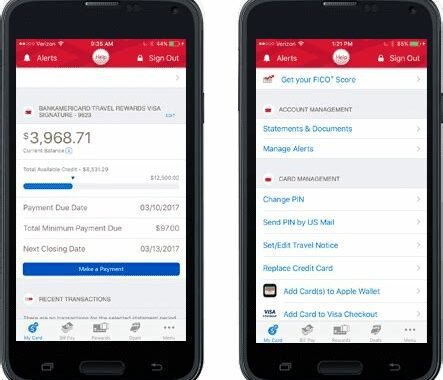
Managing your finances has never been easier with the rise of investment applications. There is a wide range of investment applications that can help you diversify your portfolio, manage your money, and even invest in cryptocurrency. We have compiled the top 10 investment applications to help you make better financial decisions.
1. Robinhood
Robinhood is a commission-free investing app that allows you to buy and sell stocks, ETFs, and cryptocurrency without paying any fees. It has a user-friendly interface, and it’s effortless to use, making it perfect for beginner investors. Robinhood also offers new users a free stock when they sign up.
2. Acorns
Acorns is a micro-investing app that allows you to invest your spare change. It rounds up your purchases to the nearest dollar and invests the difference. For example, if you buy a cup of coffee for $2.50, Acorns will round it up to $3.00 and invest the additional $0.50. Acorns charges $1 per month for accounts under $5,000 and 0.25% per year for accounts over $5,000.
3. Betterment
Betterment is a robo-advisor that manages your investments for as little as 0.25% per year. It uses algorithms to build and manage a diversified portfolio tailored to your financial goals and preferences.
4. Stash
Stash is an investment app that offers users the ability to buy fractional shares of more than 1,800 stocks and ETFs. It also offers retirement accounts and custodial accounts for minors. Stash charges $1 per month for accounts under $5,000 and 0.25% per year for accounts over $5,000.
5. Wealthfront
Wealthfront is a robo-advisor that offers investment management, financial planning, and banking services with no account minimums. It diversifies your portfolio across asset classes and uses tax-loss harvesting to optimize your returns. Wealthfront charges 0.25% per year for investment management.
6. Coinbase
Coinbase is a digital currency exchange that allows users to buy, sell, and trade cryptocurrency. It supports a wide range of cryptocurrencies, including Bitcoin, Ethereum, and Litecoin. Coinbase charges a fee of 1.49% for every transaction.
7. Personal Capital
Personal Capital is an investment app that offers a comprehensive view of your finances. It tracks your investments, accounts, and spending, allowing you to create a personalized financial plan. Personal Capital charges a fee of 0.89% for accounts up to $1 million.
8. TD Ameritrade
TD Ameritrade is a brokerage firm that offers a wide range of investment products and services, including stocks, ETFs, mutual funds, options, and futures. It has powerful trading tools and educational resources for beginner and advanced investors. TD Ameritrade charges $0 for stock and ETF trades.
9. E-Trade
E-Trade is a brokerage firm that offers a full range of investment products and services, including stocks, ETFs, mutual funds, options, and futures. It provides powerful trading tools and research resources, making it perfect for active traders. E-Trade charges $0 for stock and ETF trades.
10. M1 Finance
M1 Finance is a robo-advisor that allows users to create and manage their investment portfolio for free. It supports fractional shares and offers a wide range of ETFs and stocks to choose from. M1 Finance charges no fees for trading, managing, or using its platform.
The Bottom Line
Investment applications have revolutionized the way we invest and manage our money. They offer intuitive interfaces, low fees, and powerful tools that can help us make better financial decisions. Whether you are a beginner or an experienced investor, these 10 investment applications can help you achieve your financial goals.
Frequently Asked Question
1. What is an investment application?
An investment application is a software or mobile application that enables users to invest in various financial instruments, such as stocks, mutual funds, and bonds, among others.
2. How secure is using an investment application?
Most investment applications use advanced security protocols such as encryption, biometric authentication, and two-factor authentication to protect your personal and financial data.
3. Can I use an investment application to invest in international markets?
Yes, some investment applications allow you to invest in international stocks and securities.
4. What are the fees for using an investment application?
The fees for using an investment application vary depending on the provider. Some applications may charge a flat fee, while others may charge a percentage of the investment amount.
5. What types of investment accounts can I open through an investment application?
Most investment applications enable users to open various types of investment accounts, including taxable accounts, retirement accounts, and education savings accounts.
6. Do investment applications provide investment advice?
Some investment applications provide investment advice through robo-advisors or human advisors.
7. What is the minimum investment amount required to start using an investment application?
The minimum investment amount required to start using an investment application varies depending on the provider. Some applications have no minimum investment requirement, while others may require a minimum of $5,000 or more.
8. Can I transfer my existing investments to an investment application?
Yes, many investment applications allow you to transfer your existing investments from other accounts or brokers.
9. What are the benefits of using an investment application?
Some of the benefits of using an investment application include low fees, convenience, accessibility, and ease of use.
10. What are the risks of using an investment application?
The risks of using an investment application include market volatility, potential loss of principal, and operational risks such as system failures or cyber attacks. It is important to do your research and understand the risks before investing through an application.
In today’s fast-paced world where everything is just a click away, banking has also gone digital. Banking applications are a great way to save time and make banking easy. With so many banking applications in the market, it is challenging to choose the best ones. In this article, we have compiled a list of the top 10 banking applications in 2021.
1. Bank of America Mobile Banking
The Bank of America Mobile Banking app is a widely used banking application. It has excellent features like managing bank accounts, credit, and debit cards. The app also allows you to deposit checks remotely, transfer funds, and track account activity. The app has a user-friendly interface that makes banking easy and offers high-level security features.
2. Chase Mobile
Chase Mobile is another popular banking application. It allows you to manage your bank accounts and credit cards, transfer funds, and deposit checks remotely. The app has a user-friendly interface and offers high-level security features like fingerprint and facial recognition. One of the unique features of the app is the ability to schedule payments to payees.
3. Capital One Mobile
The Capital One Mobile app enables you to manage your bank accounts and credit cards, deposit checks remotely and transfer funds. The app has high-level security features and the ability to check balances on-the-go. It also offers a unique feature called CreditWise, which helps you monitor your credit score and report.
4. Wells Fargo Mobile
Wells Fargo Mobile is an easy-to-use banking application that allows you to manage your bank accounts, credit cards, and investment accounts. You can also transfer funds and remotely deposit checks. The app has high-level security features and the ability to view and pay bills. Additionally, Wells Fargo Mobile offers a unique feature that allows you to use your fingerprint to access the app.
5. Ally Mobile
Ally Mobile is a popular banking application that enables you to manage your bank accounts, invest, pay bills, and deposit checks remotely. The app has a user-friendly interface and the ability to view all your transactions. Additionally, Ally Mobile offers high-level security features like fingerprint login, facial recognition, and two-factor authentication.
6. Simple
Simple is a banking application that allows you to set goals for savings and track them. The app has a unique Safe-to-Spend feature, which tells you how much money you have available to spend based on your bills and savings goals. You can also deposit checks remotely and transfer funds. The app has high-level security features and a user-friendly interface.
7. USAA Mobile
USAA Mobile is a banking application that is exclusively available to US military personnel and their families. The app allows you to manage bank accounts, credit cards, investment accounts, and insurance policies. You can also deposit checks remotely and transfer funds. The app has high-level security features that are certified by the Federal Financial Institutions Examination Council (FFIEC).
8. Citi Mobile
Citi Mobile is a banking application that allows you to manage your bank accounts, credit cards, and investment accounts. You can also deposit checks remotely and transfer funds. The app has high-level security features like Touch ID and facial recognition. Additionally, the app offers the ability to pay bills and view statements.
9. PNC Mobile
PNC Mobile is a banking application that allows you to manage your bank accounts, credit cards, and investment accounts. You can also deposit checks remotely, transfer funds, and view transactions. The app has a user-friendly interface and high-level security features. Additionally, PNC Mobile offers the ability to pay bills and track spending.
10. TD Bank
TD Bank is a banking application that allows you to manage your bank accounts, credit cards, and investment accounts. You can also deposit checks remotely, transfer funds, and schedule payments. The app has a user-friendly interface and high-level security features. Additionally, TD Bank offers the ability to pay bills and view statements.
Conclusion
Banking applications are a great way to save time and make banking easy. With so many banking applications in the market, it is challenging to choose the best ones. The above-listed banking applications are the most popular and have excellent features like managing bank accounts, credit, and debit cards, depositing checks remotely, and transferring funds. These apps offer high-level security features, a user-friendly interface, and unique features like scheduling payments and tracking spending.
Frequently Asked Question
1. What is a banking application?
A banking application is software designed to enable account holders to perform various banking transactions from their mobile devices or computers.
2. Is it safe to use a banking application?
Yes, it is generally safe to use a banking application provided it is downloaded from a reputable source, and the user follows proper security protocols when using it.
3. What type of transactions can I perform with a banking application?
With a banking application, you can perform basic tasks such as checking your account balance, making transfers, and paying bills. Some applications also allow you to apply for loans and set up standing orders.
4. Can I link multiple bank accounts to a single banking application?
Yes, most banking applications allow you to link several bank accounts, provided they are with the same financial institution.
5. How can I download a banking application?
You can download a banking application from your mobile device’s app store or the financial institution’s website.
6. Do I need to pay any fees for using a banking application?
Typically, using a banking application is free of charge. However, some financial institutions may charge fees for specific transactions such as international transfers.
7. How do I ensure my online banking information is secure?
To ensure your online banking information is secure, you should use strong passwords, avoid using public Wi-Fi networks, and regularly check your transaction history.
8. Can I use a banking application without an internet connection?
No, you must have an active internet connection to use a banking application.
9. What should I do if I lose my mobile device with the banking application installed?
If you lose your mobile device with the banking application installed, you should contact your financial institution immediately to disable the application and prevent unauthorized access to your account.
10. What happens if I forget my login credentials for the banking application?
If you forget your login credentials for the banking application, you can use the password reset feature or contact your financial institution for assistance with regaining access to your account.
Managing your finances can be overwhelming and confusing. However, with the increasing number of financial management applications on the market, managing your finances has become much easier. These applications can be used for tracking your income, expenses, and investments, and help you make better financial decisions. Here are the top 10 financial management applications that can help you manage your finances efficiently.
1. Mint
Mint is one of the most popular financial management applications available. This application enables you to bring together all your financial accounts in one place. You can monitor your spending, track your investments, pay bills online, and get alerts if your accounts fall below a certain balance. Mint is free, but it may show you ads for financial products.
2. Personal Capital
Personal Capital is an all-in-one financial management application that enables you to manage your finances, investments, and retirement savings. It provides you with detailed investment analysis, a fee analyzer, an investment checkup, and a retirement planner. Personal Capital is free to use, but it charges a fee for investment management services.
3. YNAB (You Need A Budget)
YNAB (You Need A Budget) is an effective financial management application that helps you take control of your finances. It uses a zero-based budgeting system that helps you allocate your funds effectively. YNAB also enables you to import transactions from your bank account, set financial goals, and track your expenses. YNAB charges $11.99 per month, but it offers a free trial period of 34 days.
4. PocketGuard
PocketGuard is a simple and easy-to-use financial management application that enables you to track your spending and savings. It provides you with an overview of your finances and alerts you if you are approaching your budget limits. PocketGuard also enables you to view your transactions, categorize your expenses, and track your bill payments. PocketGuard is free, but it offers a premium version with additional features.
5. EveryDollar
EveryDollar is a budgeting application that enables you to allocate your funds effectively. It uses a zero-based budgeting system and enables you to track your expenses, monitor your bills, and view your financial progress. EveryDollar offers a free version, but it charges $129.99 per year for the premium version, which includes additional features, such as financial coaching and investment advice.
6. Wally
Wally is a budgeting and expense tracking application that enables you to manage your finances effectively. It allows you to view your transaction history, categorize your expenses, set financial goals, and track your bills. Wally also enables you to synchronize your bank account, monitor your investment portfolio, and calculate your net worth. Wally is free, but it has a premium version with additional features.
7. Clarity Money
Clarity Money is a financial management application that focuses on helping you save money. It monitors your spending and provides recommendations for saving money on bills, subscriptions, and other expenses. Clarity Money also enables you to monitor your credit score, track your expenses, and view your financial activity. Clarity Money is free, but it may show you ads for financial products.
8. Honeyfi
Honeyfi is a financial management application that enables you to manage your finances as a couple. It allows you to view your combined budget, track your expenses, and monitor your bills. Honeyfi also enables you to share images, videos, and messages with your partner and provides you with customized financial advice. Honeyfi has both free and premium versions.
9. Acorns
Acorns is a financial management application that enables you to invest your spare change. It rounds up your purchases to the nearest dollar and invests the difference in a diversified portfolio. Acorns also enables you to set financial goals, monitor your investment portfolio, and view your financial progress. Acorns charges a monthly fee of $1, $3, or $5, depending on the plan that you choose.
10. Stash
Stash is a financial management application that enables you to invest your money in stocks and ETFs. It offers a wide range of investment options and provides you with personalized investment advice. Stash also enables you to set financial goals, track your expenses, and view your investment portfolio. Stash charges a monthly fee of $1, $3, or $9, depending on the plan that you choose.
Final Thoughts
Managing your finances can be challenging, but with the help of these financial management applications, you can simplify the process. These applications enable you to track your expenses, monitor your bills, and invest your money efficiently. However, make sure to choose an application that fits your financial goals and preferences.
Frequently Asked Question
1. What is a financial management application?
A financial management application is a software program that helps individuals and businesses manage their finances. It allows users to track their income, expenses, budget, investments, and taxes.
2. How can a financial management app help me save money?
A financial management app can help you save money by providing real-time information about your spending habits, categorizing expenses, and alerting you when you approach your budget limit. It can also help you identify areas where you can cut costs and make smart investment decisions.
3. Are financial management apps secure?
Yes, most financial management apps use encryption and other security measures to protect user data. However, be sure to check the app’s privacy policy and make sure it does not share your personal data with third parties.
4. Can a financial management app help me with my taxes?
Yes, some financial management apps offer tax tracking and reporting features, allowing you to track deductible expenses and generate tax reports.
5. How do I connect my financial management app to my bank account?
Most financial management apps require users to link their bank account or credit card using their online banking credentials. This allows the app to automatically import transactions and categorize expenses.
6. Do I need to pay for a financial management app?
There are many free financial management apps available, but they may come with limited features or display ads. Paid apps typically offer more advanced features and better customer support.
7. Can I use a financial management app with multiple devices?
Yes, most financial management apps offer cloud syncing, allowing users to access their accounts from multiple devices.
8. Can I use a financial management app to pay bills?
Some financial management apps offer bill payment features, allowing users to pay bills directly from the app.
9. Can a financial management app help me improve my credit score?
A financial management app can help improve your credit score by providing real-time information about your credit utilization and payment history. It can also help you identify areas where you can reduce debt and make on-time payments.
10. Do financial management apps provide investment advice?
Some financial management apps offer investment tracking and analysis features, but they do not provide investment advice. It is important to consult a financial advisor before making investment decisions.
Time management is an essential skill that helps you become productive and efficient in your daily activities. The use of technology can improve your time management skills by using different applications available on various devices. With hundreds of time management applications, it can be a daunting task to select the best. In this article, we have compiled a list of top 10 time management applications that can help you organize your time and complete your tasks efficiently.
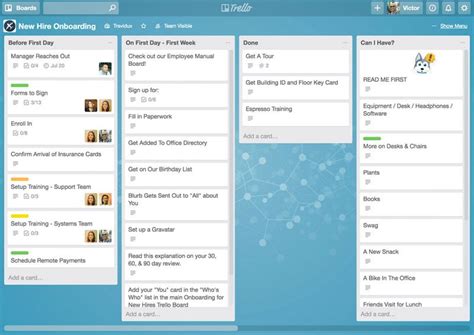
1. Trello
Trello is a popular time management tool used by millions of users globally. It uses a board design to help people organize and track their projects. Users can create cards, and the progress can be tracked from “to do” to “in progress” to “completed” stages. Trello provides intuitive and easy-to-use features, including adding labels, due dates, checklists, and comments, making it ideal for both individuals and teams.
2. RescueTime
RescueTime is an advanced time management application that helps people become more productive by monitoring how they spend their time on computer and mobile devices. With RescueTime, users can get detailed reports that show their usage patterns and micro-manage time-wasting activities. The application then recommends changes that could save you time, such as reminding you to take breaks or blocking certain websites.
3. Focus@Will
Focus@Will is a unique productivity application that provides users with music designed to help them focus and increase productivity levels. The music is scientifically curated to enhance concentration while working, learning, or studying. Users can choose different genres and adjust the tempo and intensity levels as per their preference.
4. Evernote
Evernote is one of the most popular time management applications that can help users capture their thoughts and ideas using notes, text, audio, or images. The application allows for easy organization and synchronization of notes across devices, making it easy to access your notes from anywhere you are. The app also integrates with Google Drive, Slack, and many other productivity tools.
5. Todoist
Todoist is a powerful to-do list manager that can help users stay organized and focused on their tasks. It is available in both free and paid versions, with the latter offering additional features such as labels, filters, and comments. Todoist provides smart task suggestions and will gamify tasks to help users stay motivated.
6. Forest: Stay Focused
Forest: Stay Focused is a time management application that helps users stay focused and avoid distractions by planting virtual trees. The more you use the application without opening other distracting apps or websites, the more trees will grow in your forest. You can also customize the duration of your sessions, which makes the application ideal for Pomodoro-style work sessions.
7. Be Focused
Be Focused is a time management application that provides users with a timer and task list to help them complete their work efficiently. The application follows the Pomodoro technique and encourages users to work in 25-minute intervals followed by five-minute breaks. Users can customize the duration of their work sessions and break times.
8. Focus Booster
Focus Booster is a time management application that helps users get more done in less time by using the Pomodoro technique. The application provides users with a timer that tracks their work sessions and breaks. Users can generate reports on how they spend their time, see work completion rates, and track their progress over time.
9. Time Doctor
Time Doctor is a time management tool that tracks the time spent on tasks by employees. It provides users with detailed reports on how they spend their time, making it easy to analyze where they are wasting time and increase their productivity. Time Doctor can also be used to track attendance and provide payroll data to managers.
10. Clockify
Clockify is a free time management tool that helps users track their time on specific tasks. It includes a timer that can be started and stopped, making it easy to track time spent on each project. Users can generate reports based on the time spent on each task, making it simple to optimize productivity.
Conclusion
In conclusion, these are the top 10 time management applications that can help you stay focused and become more productive. Whether you are looking for a tool to help you organize your to-do list or an application to help you avoid distractions, there is an application for everyone on this list. Try some of these time management applications to find the one that works best for you, and enjoy the benefits of a more organized and efficient life.
Frequently Asked Question
1. What is a time management application?
A time management application is a software tool that helps you track, manage and prioritize your time efficiently. It offers features such as to-do lists, calendars, reminders, time tracking, and project management tools to help you manage your time more effectively.
2. What are the benefits of using a time management application?
Using a time management application provides several benefits, including improved productivity, increased efficiency, better time usage, reduced stress, and improved work-life balance. It also helps you stay organized, meet deadlines, and complete work on time.
3. How do I choose the right time management application?
When choosing a time management application, consider factors such as the features you need, the device and operating system you use, price, and user interface. Also, read reviews, compare features, and try a few apps to find the one that suits you best.
4. How do time management applications help with prioritization?
A time management application helps with prioritization by letting you sort tasks and projects based on their urgency or importance. Some apps also allow you to assign deadlines, labels or tags to tasks, or set reminders to ensure you complete them on time.
5. Can time management applications integrate with other tools I use for work?
Yes, most modern time management applications integrate with other tools such as email, project management software, or messaging apps such as Slack. Integration helps you streamline workflows and manage tasks more efficiently.
6. Can I use a time management application for personal tasks too?
Yes, you can use a time management application for personal tasks such as grocery shopping, household chores, or fitness routines. Some time management apps even offer features that help you set personal goals and track progress.
7. How do I stay motivated when using a time management application?
To stay motivated when using a time management application, set achievable goals, break tasks into smaller chunks, reward yourself for achieving milestones, and enlist friends or family to hold you accountable.
8. Can a time management application help me make better use of my free time?
Yes, a time management application can help you make better use of your free time by helping you schedule leisure activities, hobbies, or self-care routines. It also helps you avoid distractions such as social media, TV, or excessive internet browsing.
9. What are some popular time management applications?
Some popular time management applications include Trello, Evernote, Asana, RescueTime, Todoist, and Google Calendar. Each app offers unique features and benefits, so choose the one that suits your needs.
10. Can I use a time management application while working remotely?
Yes, a time management application is especially useful when working remotely, as it allows you to stay organized and productive without the traditional office environment. It helps you manage tasks, collaborate with remote teams, and maintain a healthy work-life balance.
If you are in search of the perfect task management application for your everyday work, we have got you covered. We understand how essential organization and effective task management are in achieving success. We’ve compiled a comprehensive list of the top 10 task management applications that have proven effective to help you increase productivity and enhance your output.

1. Trello
Trello is one of the best task management applications, with a user-friendly interface that lets you organize tasks in boards, lists, and cards. It comes with a drag and drops feature, which makes it easier to move tasks around, add comments, attachments, and labels. Trello is easy and free to use, but it also has a premium version that enables you to do even more.
2. Asana
Asana is a comprehensive task management application designed to simplify teamwork and enhance productivity. It has an excellent user interface that allows you to create, organize, and prioritize tasks. It is ideal for project management, enabling you to track team progress and collaborate in real-time.
3. Todoist
Todoist is another simple yet effective task management application that enables you to organize and prioritize tasks according to your preference. It’s available on multiple platforms, allows you to set due dates, and can send you daily reminders for uncompleted tasks. It’s ideal for both basic and advanced task management needs.
4. Google Tasks
Google Tasks is a simple task management application that is perfect for Google users who require something easy and straightforward. It is integrated with other Google apps, such as Gmail and Google Calendar, and also available on mobile. You can add tasks, mark them as completed, and schedule reminders easily.
5. Evernote
Evernote is a task management application that goes beyond just managing tasks. It can take notes, research, and jot down ideas, making it ideal for those who need a more robust system. It offers features such as document scanning, OCR, and can even record audio notes. Evernote offers both free and paid versions.
6. Microsoft To Do
Microsoft To Do is a task management application that is perfect for the workplace. It syncs automatically with Outlook and Office 365, enabling you to manage tasks from within these applications. You can create tasks, add notes, and set reminders on this application. It’s available on multiple platforms.
7. Wunderlist
Wunderlist is a simple yet powerful task management tool, ideal for those who require a basic system. It offers features, such as creating grocery lists, setting reminders, and assigning due dates. It has an intuitive interface, can be accessed on multiple devices, and is available for free.
8. Jira
Jira is an advanced task management application that is perfect for software development teams. It’s a robust system designed to handle complex tasks, bugs, and features across multiple projects. It enables you to track team progress, assign tasks within a ticket, and set priorities. Jira is available both on cloud and on-premises.
9. TickTick
TickTick is a simple but feature-rich task management application that is ideal for individual and team task management. It’s free, but there’s also a premium version that offers features such as customizing themes, sub-tasks, and task comments. It has an easy-to-use interface, allows you to share lists, and provides reminders for uncompleted tasks.
10. Notion
Notion is a comprehensive task management tool that goes beyond just managing to-do lists. It’s a collaboration tool that allows you to manage projects, take notes, and plan schedules. It offers multiple integrations with other apps, and you can customize its interface to fit your needs. Notion is available for free, but there’s also a premium version that offers more features.
Conclusion
Choosing the right task management application can be a game-changer in terms of productivity and efficiency. We hope that this list of the top 10 task management applications has given you a better idea of the available options. It’s essential to choose the tool that meets your specific needs, and we’re confident that there’s an application in this list that will work for you.
Frequently Asked Question
1. What is a task management application?
A task management application is a software tool that helps individuals or teams to organize, track, and manage their tasks and projects efficiently.
2. What are the benefits of using a task management application?
Using a task management application can help you to increase your productivity, prioritize your work, organize your day, and collaborate with team members effectively.
3. Can I use a task management application on my mobile device?
Yes, most task management applications offer mobile apps that allow you to access your tasks and projects from anywhere, anytime.
4. Is it possible to collaborate with my team members using a task management application?
Yes, most task management applications offer collaboration features that allow you to assign tasks, share files, and communicate with your team members.
5. What are the popular task management applications available in the market?
Some popular task management applications include Trello, Asana, Microsoft To Do, Todoist, and Wunderlist.
6. How can I choose the right task management application for my needs?
To choose the right task management application, you should consider your specific needs, such as the features you require, your budget, and the size of your team.
7. Is it possible to integrate my task management application with other productivity tools?
Yes, most task management applications offer integrations with other productivity tools such as calendars, email clients, and project management tools.
8. Can I customize my task management application to suit my workflow?
Yes, most task management applications offer various customization options such as the ability to create custom fields, tags, and labels.
9. Will my data be secure in a task management application?
Yes, most task management applications take data security seriously and offer various security measures such as encryption, two-factor authentication, and secure data storage.
10. Can I use a task management application for personal use?
Yes, you can use a task management application for personal use to organize your daily tasks, manage your goals, and improve your productivity.
Project management applications are essential for keeping track of tasks, deadlines, and progress. In today’s business world, there are countless options when it comes to choosing a project management application. This article will highlight the top ten project management applications, based on user reviews and features offered.

1. Trello
Trello is a user-friendly and versatile project management application that is perfect for small to medium-sized teams. The application uses a visual approach to managing tasks, allowing users to create boards, lists, and cards that can be easily customized. Users can also assign specific tasks to team members and set due dates. Source: https://tse1.mm.bing.net/th?q=Trello
2. Asana
Asana is a powerful project management application designed for larger teams, and it offers a wide range of features to streamline workflow. The application includes tools for task management, project scheduling, and team collaboration. One unique feature of Asana is its timeline view, which allows teams to track progress over time. Source: https://tse1.mm.bing.net/th?q=Asana
3. Wrike
Wrike is a cloud-based project management system that is ideal for larger teams working on complex projects. The software includes features for task management, time tracking, and project scheduling. Additionally, Wrike offers a system for tracking and reporting on team progress, which makes it easy to identify areas for improvement. Source: https://tse1.mm.bing.net/th?q=Wrike
4. Basecamp
Basecamp is a popular project management application that is well-suited for small to medium-sized teams. The application includes features for task management, team collaboration, and project scheduling. One of the unique features of Basecamp is its ability to group related tasks and projects, which makes it easy to focus on specific areas of a project. Source: https://tse1.mm.bing.net/th?q=Basecamp
5. Jira
Jira is a powerful project management application that is designed for large, complex projects. The software includes tools for tracking tasks, assigning team members, and reporting on progress. Jira is particularly suited for software development teams because it includes features for tracking bugs and issues that may arise during development. Source: https://tse1.mm.bing.net/th?q=Jira
6. Teamwork
Teamwork is a comprehensive project management application that is ideal for larger teams working on complex projects. The software includes features for task management, team collaboration, and time tracking. Additionally, Teamwork offers tools for project management and resource planning, which makes it easy to manage resources and allocate tasks. Source: https://tse1.mm.bing.net/th?q=Teamwork
7. Monday.com
Monday.com is a user-friendly and versatile project management application that is perfect for small to medium-sized teams. The software includes features for task management, team collaboration, and project scheduling. One unique feature of Monday.com is its customizable dashboard, which makes it easy to track progress and stay on top of deadlines. Source: https://tse1.mm.bing.net/th?q=Monday.com
8. Zoho Projects
Zoho Projects is a cloud-based project management application that is ideal for small to medium-sized businesses. The software includes features for task management, project scheduling, and team collaboration. Additionally, Zoho Projects includes a suite of tools for reporting and analytics, which makes it easy to monitor progress and identify areas for improvement. Source: https://tse1.mm.bing.net/th?q=Zoho+Projects
9. Smartsheet
Smartsheet is a cloud-based project management application that is well-suited for larger teams working on complex projects. The software includes features for project scheduling, task management, and team collaboration. Additionally, Smartsheet offers a suite of tools for reporting and analytics, which makes it easy to track progress and identify areas for improvement. Source: https://tse1.mm.bing.net/th?q=Smartsheet
10. Microsoft Project
Microsoft Project is a comprehensive project management application that is designed for large, complex projects. The software includes features for project scheduling, task management, and team collaboration. Additionally, Microsoft Project offers a suite of tools for reporting and analytics, which makes it easy to monitor progress and identify areas for improvement. Source: https://tse1.mm.bing.net/th?q=Microsoft+Project
Conclusion
When it comes to project management applications, there are countless options to choose from. The ten applications listed above are among the most popular and trusted by users. Whether you’re managing a small team or working on a large, complex project, these applications provide the features and tools necessary to stay on track and meet deadlines. Consider the needs of your team and the features offered by each application before making a decision. With the right project management application, you can streamline workflow and achieve success.
Frequently Asked Question
1. What is a Project Management Application?
Project Management Application is an online tool that helps to plan, manage and track projects. It also helps teams to collaborate and communicate effectively to deliver projects successfully.
2. How does Project Management Application help to increase team productivity?
Project Management Application helps to streamline project workflows, allocate resources, track time, and monitor project progress in real-time. It creates a single source of truth for all team members, leads to fewer errors, and saves time and effort.
3. What are some must-have features of a Project Management Application?
The essential features of a Project Management Application are task management, time tracking, team collaboration, project tracking, reporting, and analytics.
4. How can a Project Management Application help to manage remote teams?
Project Management Application has features such as task assignment and tracking, real-time communication, file sharing, and document management that enable remote teams to work effectively and efficiently. It provides a centralized workspace and enhances transparency and accountability.
5. Is it possible to customize a Project Management Application to suit my team’s specific needs?
Yes, some Project Management Applications allow customization based on specific requirements. Users can add or remove features, modify workflows, and create custom reports.
6. How can a Project Management Application help to improve project communication?
Project Management Application has built-in communication tools, such as chat, email, and video conferencing to allow teams to communicate effectively without leaving the application. It also provides a centralized platform for team members to discuss, ask questions, and share feedback.
7. Is it essential to pay for a Project Management Application to receive its full benefits?
The free version of a Project Management Application has features that allow users to manage their projects. However, the paid version offers additional features such as advanced reporting, customization, and integrations, which provide extra benefits.
8. Can a Project Management Application integrate with other software tools?
Yes, most Project Management Applications offer integration with other tools such as CRM, accounting, and marketing automation software. This provides users with seamless workflows and ensures that all data is synced and up-to-date.
9. How safe and secure is the data in a Project Management Application?
Most Project Management Applications provide advanced security features such as SSL encryption, two-factor authentication, and access controls to protect users’ data. It also employs cybersecurity experts to ensure that any vulnerabilities are identified and patched promptly.
10. Can a Project Management Application help to increase profitability?
Yes, Project Management Application can help to increase profitability by improving time management, reducing errors, and increasing productivity. It ensures that projects are delivered on time and within budget, and it provides accurate data for invoicing and cost analysis.
In this era of global connectivity, travel and business have made communication an essential aspect of daily life. While language barriers can still pose as a challenge, technology has made it easier for people to communicate effectively. Translator apps have been developed to help in translating languages, allowing for seamless communication between individuals regardless of language differences. Here are the top 10 translator apps that can make communication easier for anyone.

1. Google Translate
Google has created a powerful translator app that can detect over 100 languages. The app offers instant translations, voice translations, and handwriting recognition. This means that users can either type or write the text they want to translate, or speak into the app and it will translate it into their preferred language. It also supports both Android and iOS devices for convenience.
2. Microsoft Translator
Microsoft Translator is another app that offers real-time language translation. Available for both Android and iOS devices, the app can translate up to 60 languages through text and speech. It also allows users to translate text from images taken on their devices, making it perfect for travel, business, and academics.
3. iTranslate
iTranslate is one of the most popular translator apps in the market, with over 200 million downloads worldwide. It offers text, voice, and image translation for over 100 languages. Additionally, it has a feature that enables the app to speak back the translated text for better pronunciation and use in conversation. The app is compatible with iOS and Android devices, making it accessible to all users.
4. TripLingo
TripLingo goes beyond just translation, offering useful cultural insights for travelers. It provides over 100 languages with a library of useful phrases depending on the user’s purpose, whether it be business or recreational travel. The app also has a “Slangslator” feature, which can provide translations for colloquial expressions that are unique to certain regions. TripLingo is available on both iOS and Android devices for convenience.
5. SayHi Translate
SayHi Translate is a user-friendly app that offers instant voice translations for up to 90 languages. It also boasts a speech recognition feature, enabling users to speak into the microphone and get their translated text instantly. Additionally, users can adjust the speed of the spoken translations and access previously translated phrases for convenience. SayHi Translate is available on both iOS and Android devices.
6. Translate Now – Language Translator
Translate Now – Language Translator is a fast and accurate translator app that offers over 100 languages for translation. The app offers text and voice translations, with features such as fast typing, handwriting recognition, and keyboard integration. Additionally, users can save their favorite translations and share them on various social media platforms. Translate Now is available for both iOS and Android users for convenience.
7. Voice Translator – Speak & Translate
Voice Translator – Speak & Translate is a perfect app for real-time voice translations in over 50 languages. It is effortless to use, and users only need to speak into their device’s microphone to receive the translated text. The app also records the user’s voice translations, enabling them to listen to the pronunciation and improve their communication skills. Voice Translator is compatible with both Android and iOS devices.
8. Reverso Translate and Dictionary
Reverso Translate and Dictionary is an excellent app for both translation and learning new languages. It features a text and voice translation option while offering definitions of words and phrases through its built-in dictionary. Additionally, the app provides users with real-time context translations for idioms and expressions, making it particularly useful for business and academic purposes. The app is available for both iOS and Android devices.
9. Papago Translator
Papago Translator is a Korean translator app that can be used for up to nine languages, offering text and voice translations. The app provides real-time photo translation, enabling translation via an image taken using the device’s camera. Additionally, the app has a conversation mode that allows for real-time translations while having a chat with someone in a different language. Papago Translator is available for both Android and iOS devices.
10. Translate Me – Live Translator
Translate Me – Live Translator is an excellent app for real-time translations during calls and conversations with someone from another language. It offers voice, text, and photo translations, making it versatile and accessible. Additionally, the app has a feature that saves users frequently used translations, removing the need to re-enter the text or a repeat conversion. Translate Me – Live Translator is available for both iOS and Android devices.
Conclusion
Translator apps have revolutionized communication and have reduced language barriers in various sectors, including travel, business, and education. These top 10 translator apps offer excellent features and user-friendly interfaces that cater to users’ different translations and learning needs. Whether on iOS or Android platforms, these apps can provide seamless translations and help bridge any communication gap, making it essential to have at least one of them installed on your device.
Frequently Asked Question
1. Can a Translator App translate multiple languages at once?
Yes, some Translator Apps can translate multiple languages at once. They usually support a wide range of languages for translation.
2. Do Translator Apps require an internet connection?
Most Translator Apps require an internet connection to function properly since they need the internet to access their translation databases. Some apps, however, provide an offline mode for basic translations.
3. How accurate are Translator Apps?
Translator Apps can be fairly accurate, but the quality of the translation depends on the app’s algorithm and the complexity of the translation. Some apps even use AI technology to improve their accuracy over time.
4. Can Translator Apps translate slang or informal language?
Most Translator Apps are designed to translate standard or formal language. However, some apps incorporate slang translations or expressions that are commonly used in everyday language.
5. Can I use a Translator App for business or legal translations?
While Translator Apps can be useful for simple translations and conversations, they may not be appropriate for legal or business translations that require a high level of accuracy and professionalism. In such cases, it is best to consult a professional translator.
6. Can I translate images or handwritten text using a Translator App?
Some Translator Apps allow you to translate text within images or handwritten text, but the accuracy may not be perfect.
7. How can I improve the accuracy of a Translator App?
You can improve the accuracy of a Translator App by providing clear and concise sentences, using standard language, and checking the translation for errors.
8. Is it safe to use a Translator App for confidential information?
Most Translator Apps claim to have high privacy and security standards, but it is always recommended to read the privacy policy and terms of service before using an app for confidential information.
9. Can I use a Translator App while traveling abroad?
Yes, Translator Apps can be a useful tool when traveling abroad because they can help you communicate with locals and navigate unfamiliar territory.
10. Are Translator Apps usually free?
Many Translator Apps are free to download and use, but some apps may require a subscription or charge for certain features.
Missing an important deadline or appointment is frustrating, but with the help of a reminder app, you can stay on top of your schedule effortlessly. Here are the top 10 reminder apps that will help you stay organized and never forget anything important again.

1. Any.do
Any.do is an all-in-one to-do list and reminder app that simplifies your life and keeps you on track. It features an intuitive interface that makes it easy to use and manage all your tasks and reminders. You can set reminders for specific times, dates, or locations and get notified when it’s time to take action. The app also offers customizable widgets that show your daily schedule, and you can sync Any.do with your calendar and other apps for seamless integration.
Source: https://tse1.mm.bing.net/th?q=Any.do
2. Todoist
Todoist is another excellent reminder app that helps you organize your daily tasks and get things done. It offers a clean and simple interface that makes it easy to manage your reminders, deadlines, and appointments. You can set reminders via email, push notifications, or SMS, and the app also allows you to prioritize your tasks and create sub-tasks and sub-projects. Todoist also integrates with various apps like Google Calendar, Outlook, and Trello, making it an ideal choice if you’re looking for a powerful reminder app.
Source: https://tse1.mm.bing.net/th?q=Todoist
3. Google Keep
Google Keep is a versatile reminder app that allows you to create notes, lists, and reminders seamlessly. You can set reminders for specific times, dates, or places and get notified when it’s time to complete a task or attend a meeting. The app also offers an AI-powered feature that suggests reminders based on your location or previous actions. You can also collaborate with your friends and family on notes and lists, making Google Keep an ideal choice for team productivity.
Source: https://tse1.mm.bing.net/th?q=Google+Keep
4. Wunderlist
Wunderlist is a popular reminder app that helps users manage their to-do lists and reminders effortlessly. The app offers a clean and easy-to-use interface that makes it simple to create and manage reminders. You can set reminders for specific times and dates and get notifications when it’s time to take action. Wunderlist also allows you to share your lists and reminders with family and friends and collaborate on tasks in real-time.
Source: https://tse1.mm.bing.net/th?q=Wunderlist
5. Evernote
Evernote is a comprehensive app that lets you stay organized and productive by keeping all your notes, reminders, and lists in one place. It features an intuitive interface that makes it easy to capture ideas, create to-do lists, and set reminders. You can also add attachments like images, voice memos, and PDFs to your notes and reminders, making Evernote an ideal choice for creative individuals, freelancers, and professionals.
Source: https://tse1.mm.bing.net/th?q=Evernote
6. Microsoft To Do
Microsoft To Do is a simple and effective reminder app that helps you manage your daily tasks and schedule. It syncs seamlessly with your Microsoft account, making it easy to access your reminders and lists across multiple devices. The app allows you to set reminders for specific times, dates, or places and customize recurring tasks. You can also collaborate with others on tasks and lists, making it an ideal choice for teams.
Trello is a highly effective reminder app that helps you organize your tasks, projects, and deadlines visually. It offers an intuitive card-based interface that allows you to create tasks, add notes, and set reminders quickly. You can also create boards and lists, add attachments, and collaborate with team members in real-time. Trello also integrates with a host of third-party apps, making it highly versatile and customizable.
Source: https://tse1.mm.bing.net/th?q=Trello
8. Remember the Milk
Remember the Milk is a classic reminder app that has been around since 2004. It features an intuitive interface that makes it easy to manage your tasks and schedule. You can create and prioritize tasks, set due dates and reminders, and get notified when it’s time to complete a task. The app also allows you to share lists and tasks with others and syncs seamlessly across multiple devices and platforms.
AnyList is a popular reminder app that helps you create and manage grocery lists, meal plans, and shopping lists. You can set reminders for upcoming meals, add recipes, and customize your lists according to your preferences. The app also offers an auto-complete feature that makes it easy to add items quickly, and you can share your lists with family and friends, making AnyList an ideal choice for busy households.
Source: https://tse1.mm.bing.net/th?q=AnyList
10. Due
Due is a simple reminder app that is ideal for users who want to set quick reminders and notifications. It offers an intuitive interface that makes it easy to create reminders, set recurring tasks, and get notified when it’s time to take action. Due also allows you to snooze or postpone reminders, ensuring that you never forget anything important.
Source: https://tse1.mm.bing.net/th?q=Due
Conclusion
These are the top 10 reminder apps that will help you stay organized, productive, and on top of your schedule. Whether you’re a freelancer, a student, or a busy professional, there is an app on this list that will suit your needs. From intuitive interfaces to powerful customization options, these apps have everything you need to stay on top of your tasks and never forget anything important again.
Frequently Asked Question
1. What is a reminder app?
A reminder app is a software tool that enables you to set up reminders for important events or tasks that you need to remember.
2. What types of reminders can I create with a reminder app?
You can create various types of reminders, including recurrent reminders, one-time reminders, location-based reminders, time-based reminders, and many others.
3. Are reminder apps free or paid?
Most reminder apps have both free and paid versions. The free version may have basic features, while the paid version may offer additional features.
4. Can I sync my reminders across multiple devices?
Yes, most reminder apps have a sync feature that enables you to synchronize your reminders across multiple devices.
5. Can I share my reminders with other people?
Yes, some reminder apps allow you to share your reminders with other people. This can be useful if you work on a project with other people, and you need to remind them about specific deadlines or tasks.
6. How do I set up a reminder in a reminder app?
To set up a reminder, open your reminder app, click on the “create new reminder” button, enter the task or event, and set the date and time of the reminder.
7. Can I customize my reminders?
Yes, most reminder apps allow you to customize your reminders. You can change the sound, snooze duration, repeat interval, and other settings.
8. What happens if I miss my reminder?
If you miss your reminder, most reminder apps will still record the event or task as completed. However, you may want to reschedule the reminder for a later time or date.
9. How do I delete a reminder?
To delete a reminder, open your reminder app, find the reminder that you want to delete, and click on the “delete” button.
10. Is my data safe in a reminder app?
Most reminder apps have measures in place to protect your data. However, it is always a good idea to check the app’s privacy and security policy to ensure that your data is safe.
In today’s fast-paced world, tracking appointments, meetings, and events can become overwhelming. Fortunately, with the help of smart technology, we can now easily organize our schedules with just a few clicks on our mobile devices or computers. In this article, we present the top 10 calendar applications that can help you keep track of your busy schedule.
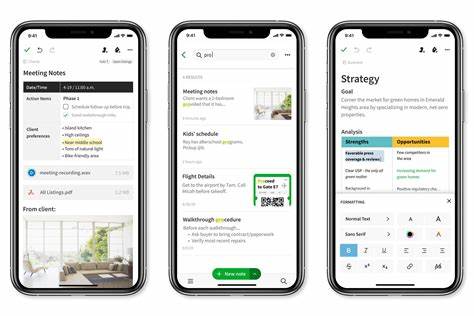
10. Calendly
{“Calendly”}
Calendly is a popular scheduling software used by various organizations, including corporations, businesses, and individuals. Calendly syncs with various calendars, such as Google, Outlook, and iCloud, allowing your availability to be seamlessly shown to your clients, colleagues or team members. You can set up various meeting types and time zones, so meeting scheduling can be hassle-free. The software’s interface is user-friendly and can be customized according to your preference.
9. Any.do
{“Any.do”}
Any.do is a calendar and task management software, allowing you to manage your workload and schedule in one convenient platform. You can easily organize your to-do list and create events, with a straightforward interface that is easy to navigate. Any.do syncs with multiple calendars and also integrates with various applications such as Slack and WhatsApp, making communication within your workspace seamless.
8. Microsoft Outlook
{“Microsoft Outlook”}
Microsoft Outlook is a widely used email and calendar application, with various functionalities that help you stay organized. With Outlook, you can schedule appointments, meetings or events, create a to-do list, and even track your expenses. It also integrates with various email accounts, including Gmail and Yahoo, in one inbox, allowing you to manage your emails and schedule from the same platform.
7. Apple Calendar
{“Apple Calendar”}
Designed for Apple users, the Apple Calendar comes pre-installed on all Apple devices, including iPhone, iPad, and Mac. It’s easy to use, with a clean interface and synchronization across all Apple devices. You can create custom schedules and manage multiple calendars at once. The Apple Calendar is also easily shareable, allowing you to collaborate with others and keep everyone informed of plans.
6. Google Calendar
{“Google Calendar”}
Google Calendar is the most popular calendar application around, used by millions worldwide. It provides an accessible way to organize your schedule, including integration with other Google applications, such as Gmail and Google Drive. Google Calendar syncs across all devices, allowing you to access your calendar at any time, from anywhere. You can also create multiple calendars, share events with colleagues, and create reminders to ensure you meet all your deadlines.
5. Trello
{“Trello”}
Trello is another comprehensive tool that offers both task management and calendar functionalities. It offers a drag-and-drop interface that allows you to move tasks around and schedule them easily. Trello also offers various templates and boards, so you can customize your workflow and manage your workload accordingly. Its collaboration features allow you to work with your team seamlessly.
4. Fantastical 2
{“Fantastical 2”}
Fantastical 2 offers various features for scheduling and is praised for its natural language input, which allows you to schedule events and appointments just by typing them out. It’s also highly customizable, with various themes and integrations for third-party applications, such as Google Maps and Siri. Fantastical 2 also offers the “Today View” feature, allowing you to view your events for the day at a glance.
3. Cozi
{“Cozi”}
Cozi is a highly recommended calendar application for families, allowing you to manage multiple schedules in one platform. You can create shared lists and calendars and even set reminders for your family members. Cozi also offers various features, such as meal planning and recipe storage, so meal planning and grocery shopping can be more manageable. Cozi allows you to stay informed about all family activities, appointments, and events in one place.
2. Woven
{“Woven”}
Woven is a new calendar application that offers advanced scheduling features, including group scheduling, scheduling links, and built-in analytics. Its artificial intelligence (AI) technology helps you save time by automatically suggesting optimal meeting times and providing data about your meeting history, such as the best times to hold meetings. Woven integrates with various calendars, including Google and Outlook, so you can easily transition to Woven without losing any existing events.
1. Notion
{“Notion”}
Notion is a multi-functional tool that offers various features, including task management, note-taking, and a fully customizable workspace, as well as a calendar application. Notion’s calendar offers various views, including daily, weekly, and monthly calendars. With its clean interface, you can quickly create and manage your schedule, as well as add notes and to-do lists. Notion also allows you to import your existing events from various calendars, including Google and Apple, making the transition to Notion seamless.
Conclusion
In conclusion, managing your schedule becomes more manageable with the right calendar application. Whether you’re looking for a quick and easy scheduling tool or a comprehensive task management platform, there is a calendar application that suits your needs. The above-listed applications are some of the top choices in the market, known for their seamless integration, customization, and advanced features.
Frequently Asked Question
1. How do I add an event to my calendar?
To add an event to your calendar, open the calendar app and tap on the date you want to add the event to. Then, click on the ‘Add Event’ button and fill in the details such as the event name, time, location, and any additional notes.
2. Can I set reminders for my events?
Yes, you can set reminders for your events. When adding an event, you can choose to add a reminder for a certain amount of time before the event occurs.
3. How can I view my calendar by week or month?
To view your calendar by week or month, navigate to the ‘Week’ or ‘Month’ view. You should be able to toggle between views by clicking on the appropriate button in the top right corner.
4. Can I add multiple calendars to my app?
Yes, you can add multiple calendars to your app. To add a new calendar, click on the ‘Settings’ button within the app and then click on ‘Add Calendar’.
5. How do I delete an event?
To delete an event, click on the event within your calendar and select ‘Delete Event’. You can also swipe left on the event and select ‘Delete’ as well.
6. Can I share my calendar with other people?
Yes, you can share your calendar with other people. Navigate to the ‘Settings’ in the app and click on ‘Share Calendar’. You should be able to enter the email addresses of the people you would like to share your calendar with.
7. How can I search for a specific event within my calendar?
To search for a specific event within your calendar, click on the ‘Search’ button within the app and enter your search term.
8. How do I change the color of a specific event in my calendar?
To change the color of a specific event, click on the event within your calendar and select ‘Edit Event’. You should be able to change the color of the event from there.
9. How do I set up a recurring event?
To set up a recurring event, click on ‘Add Event’ within the app and select ‘This event repeats’. You can then choose the frequency and end date for the recurring event.
10. Can I view different time zones within my calendar?
Yes, you can view different time zones within your calendar. Navigate to the ‘Settings’ in the app and click on ‘Time Zone’. You can then toggle on the option to ‘Show secondary time zone’.
Are you tired of using traditional notepads and paper? Keeping track of your notes and to-do lists can be challenging, especially if you’re a busy person. Fortunately, technology has brought in numerous applications that can make it easier for you to take notes and manage your tasks. In this article, we have compiled a list of the top 10 notes applications for you to choose from.
1. Evernote
Evernote is one of the most popular notes-taking applications in the market. It’s been around for years and offers a wide variety of features to help you stay organized. It allows you to create notes in different formats, including text, audio, and video. It also offers a tagging system that allows you to categorize your notes, so you can easily find them when you need them.
2. OneNote
OneNote is another popular note-taking application that comes with Microsoft Office. It allows you to create notes in different formats, similar to Evernote. It also offers a hierarchical organization system that allows you to create notebooks, sections, and pages. OneNote also allows you to sync your notes across multiple devices, so you can access them from anywhere.
3. Google Keep
Google Keep is a simple yet powerful note-taking application that comes with Google Drive. It allows you to create notes in different formats, including text, audio, and images. It also offers a color-coding system that allows you to categorize your notes. Google Keep also allows you to set reminders for your notes, so you don’t forget important tasks.
4. Simplenote
Simplenote is a clean, minimalistic note-taking application that allows you to create notes in plain text format. It offers a tagging system that allows you to categorize your notes, and a search function that helps you find them easily. Simplenote also allows you to sync your notes across multiple devices in real-time.
5. Notion
Notion is a multipurpose productivity application that offers note-taking, task management, and project management features. It allows you to create notes in different formats, including text, audio, and video. It also offers a hierarchical organization system that allows you to create pages, sub-pages, and databases. Notion also allows you to collaborate with other users on your notes and tasks.
6. Bear
Bear is a note-taking application that offers a simple, clean, and elegant interface. It allows you to create notes in different formats, including text, images, and files. It also offers a tagging system that allows you to categorize your notes, and a search function that helps you find them easily. Bear also allows you to sync your notes across multiple devices.
7. Apple Notes
Apple Notes is a default note-taking application for Apple users. It allows you to create notes in different formats, including text, images, and sketches. It also offers a hierarchical organization system that allows you to create folders, sub-folders, and notes. Apple Notes also allows you to sync your notes across multiple devices using iCloud.
8. Zoho Notebook
Zoho Notebook is a free note-taking application that offers a beautiful and intuitive interface. It allows you to create notes in different formats, including text, audio, and images. It also offers a tagging system that allows you to categorize your notes, and a search function that helps you find them easily. Zoho Notebook also allows you to sync your notes across multiple devices.
9. Turtl
Turtl is a secure and private note-taking application that offers end-to-end encryption. It allows you to create notes in different formats, including text, images, and files. It also offers a tagging system that allows you to categorize your notes, and a search function that helps you find them easily. Turtl also allows you to sync your notes across multiple devices.
10. Standard Notes
Standard Notes is a private and secure note-taking application that uses encryption to protect your notes. It allows you to create notes in different formats, including text, images, and rich-text. It also offers a tagging system that allows you to categorize your notes, and a search function that helps you find them easily. Standard Notes also allows you to sync your notes across multiple devices.
Conclusion
Choosing the right note-taking application can make a significant difference in your productivity. Each of the applications mentioned above offers a unique set of features that can meet your needs as a user. Whether you’re looking for a simple and minimalistic application or an all-in-one productivity suite, there’s an app on this list that will suit you. Try to experiment with each of them to find the perfect fit for your needs.
Frequently Asked Question
1. What is a notes application?
A notes application is a software program or mobile app that allows users to create and store notes, memos, and other types of information in a digital format.
2. What are some common features of notes applications?
Common features of notes applications include the ability to create and edit notes, organize notes with tags or folders, set reminders, and sync notes across devices.
3. Are notes applications typically free or do they cost money?
There are both free and paid notes applications available, with the functionality and features varying depending on the app and whether or not you choose to pay for it.
4. Can notes applications be used collaboratively with other users?
Many notes applications offer collaborative features such as the ability to share notes with others, leave comments on notes, and work on notes together in real-time.
5. What types of information can be stored in a notes application?
A notes application can be used to store a wide range of information, including to-do lists, meeting notes, project plans, shopping lists, and more.
6. How secure are notes applications?
The level of security provided in notes applications can vary depending on the app and the settings you choose. Some notes applications offer password protection, encryption, and other security measures to keep your information safe.
7. Can notes applications be accessed offline?
Many notes applications offer offline access, allowing you to access and edit your notes even when you are not connected to the internet.
8. Are notes applications compatible with all devices and operating systems?
Most notes applications are designed to be compatible with multiple devices and operating systems, including desktops, laptops, smartphones, and tablets. However, it’s important to check the app’s compatibility before downloading it.
9. How much storage space do notes applications typically require?
The amount of storage space required by a notes application can vary, depending on the number of notes you have and the size of any media files included in those notes.
10. Can notes applications be used for note-taking in educational settings?
Notes applications can be a useful tool for taking notes in educational settings, and many offer features such as the ability to organize notes by class or subject, add multimedia content, and share notes with others.
Presentations are a great way for individuals and businesses to showcase their ideas, products or services to clients, investors, or audience. Whether it is for a business meeting, a conference, or a lecture, having the right presentation application makes all the difference. Here is a list of the top 10 presentation applications available today:
1. Microsoft PowerPoint
Microsoft PowerPoint is the most popular presentation application used by individuals and businesses worldwide. It is part of the Microsoft Office suite and is available on both Windows and Mac computers. You can create presentations with text, images, graphs, charts, audio, and video files. With its vast collection of templates and themes, you can create professional and visually appealing presentations with ease. Microsoft PowerPoint also has collaboration features that allow several users to work on a presentation at the same time.
2. Prezi
Prezi is a cloud-based presenting application that enables users to create dynamic and engaging presentations. It allows users to zoom in and out of their slides, creating an interactive and engaging experience for the audience. Prezi has a variety of templates to choose from, or you can start from scratch. Prezi also supports collaboration, making it easy for several people to work on a presentation from different locations.
3. Keynote
Keynote is Apple’s presentation application that is designed exclusively for Mac users. With Keynote, you can create beautiful and visually appealing presentations with ease. Keynote also supports real-time collaboration, enabling multiple users to work on a presentation simultaneously. Keynote has a comprehensive collection of themes, styles, and effects, making it easy to create unique and eye-catching presentations.
4. Google Slides
Google Slides is a cloud-based presentation application available for free through Google Drive. It is easy to use and accessible on any device with an internet connection. Google Slides has a vast collection of templates to choose from, or you can start from a blank slide. With Google Slides, you can work on a presentation with others in real-time, and it automatically saves your work in the cloud. Additionally, it integrates with other Google products like Google Sheets and Google Docs, making presentations creation more comfortable.
5. Haiku Deck
Haiku Deck is a presentation application used to create visually stunning slide decks. Haiku Deck is a cloud-based presentation application that allows users to create presentations on their laptops, desktops, or mobile devices. Haiku Deck has a vast collection of themes and templates for even the most novice presentation creators. Haiku Deck also provides access to free stock images through their integration with Unsplash, making it easier to create visually stunning presentations.
6. Zoho Show
Zoho Show is a cloud-based presentation application that provides users with an easy-to-use interface and allows for real-time collaboration. It comes equipped with a variety of themes, fonts, and formatting tools. Zoho Show also has templates and images that can be used to create beautiful slide decks in a matter of minutes. With the integration of the Zoho Suite, users can work on their presentations alongside their other productivity apps, saving time and streamlining their workflow.
7. Canva Presentations
Canva Presentations is a cloud-based application for creating beautiful, eye-catching slide decks. Its intuitive drag-and-drop interface and its library of over 1 million templates, illustrations, graphics, and images make it an excellent application for both novice and experienced users. Canva Presentations allows for real-time collaboration and integrates with other popular tools like Google Drive and Dropbox.
8. WPS Office Presentation
WPS Office Presentation is a free, cross-platform presentation application that allows users to create persuasive and professional presentations. It comes with a wide range of templates and themes that allow users to create visually appealing presentations quickly. WPS Office Presentation also supports real-time collaboration, enabling multiple users to work on a presentation simultaneously. Additionally, it supports popular file formats, making it easy to import and export presentations between different applications.
9. Adobe Spark Presentations
Adobe Spark is a cloud-based platform that enables users to create visually stunning presentations with ease. Adobe Spark allows users to create slide decks with unique animations, videos, and voiceovers. Adobe Spark Presentations provides a user-friendly interface that is intuitive and easy to use. Adobe Spark also comes with integrated collaboration tools that are suitable for working with a remote team.
10. Sliderocket
Sliderocket is a cloud-based presentation application that comes with enterprise-level features. Sliderocket allows users to create dynamic and visually appealing presentations with ease. Sliderocket has a vast collection of themes and templates, and it supports real-time collaboration. Sliderocket also provides tracking features that allow users to track who has viewed their presentation, how long they spent, and what actions they took while viewing the presentation.
Conclusion
Whether you are a student, teacher, businessman, or marketer, having the right presentation application can make all the difference in how effectively you communicate your message. These top 10 presentation applications offer different features and tools, so you need to choose the one that fits your needs the most. By choosing the right application, you can ensure that your presentation is both engaging and professional, leaving a lasting impression on your audience.
Frequently Asked Question
1. What is a presentation application? A presentation application is software that allows users to create and present multimedia presentations, typically in the form of slide shows.
2. What are examples of presentation applications? Examples of presentation applications include Microsoft PowerPoint, Google Slides, Apple Keynote, and Prezi.
3. What are the key features of a presentation application? The key features of a presentation application include the ability to create and edit slides, add multimedia elements such as images and videos, apply transitions and animations, and present the slideshow in a variety of formats.
4. Can I collaborate with others on a presentation using a presentation application? Yes, many presentation applications allow for collaboration and real-time editing with multiple users.
5. Can I use my own images and audio in a presentation? Yes, most presentation applications allow users to import and embed their own images, videos, and audio files.
6. Can I control the presentation remotely? Yes, many presentation applications offer remote control options, such as a mobile app or a remote clicker, to give presenters more freedom to move around while giving their presentation.
7. Can I convert my presentation to different file formats? Yes, most presentation applications allow users to export their presentation as a PDF, image, video, or other file format for sharing or archiving purposes.
8. Can I add interactive elements to my presentation? Yes, many presentation applications allow for the creation of interactive elements such as quizzes, polls, and hyperlinked content.
9. Can I share my presentation online? Yes, most presentation applications allow users to share their presentations online using cloud-based storage services or presentation hosting platforms.
10. Is training or experience required to use a presentation application? While some level of training or experience may be helpful, most presentation applications are designed with user-friendliness in mind and provide helpful tools and tutorials to guide users through the process of creating and presenting their slideshows.
Spreadsheets have come a long way since the early days of VisiCalc. Today, they are one of the most essential tools in business and personal finance. Whether you need to organize data, create sales reports, or plan a budget, a good spreadsheet application can make a world of difference. Here are the top 10 spreadsheet applications available today.

1. Microsoft Excel
Microsoft Excel is the most popular spreadsheet application in the world. It’s been around since the mid-80s and has become a staple for businesses and individuals alike. Excel is incredibly powerful, with features like pivot tables, data validation, and conditional formatting. It also integrates seamlessly with other applications in the Microsoft Office Suite.
Pros:
Powerful and versatile
Works well with other Microsoft Office applications
Large online community for support and tips
Cons:
Expensive if purchased separately from Office suite
Steep learning curve for advanced features
Not available on all devices
2. Google Sheets
Google Sheets is a cloud-based spreadsheet application offered by Google. It’s free to use and accessible from any device with an internet connection. Google Sheets has many of the same features as Excel, including data validation, pivot tables, and conditional formatting. It also makes it easy to collaborate in real-time with others.
Pros:
Free to use
Accessible from any device with an internet connection
Easy collaboration features
Cons:
May not be as powerful as Excel for advanced users
Can be slow when working with large datasets
Offline access requires additional setup
3. Apple Numbers
Apple Numbers is the spreadsheet application included with the Apple iWork suite. It’s designed specifically for Mac and iOS users and offers a simple, intuitive interface. Numbers has a great selection of templates and offers easy-to-use charts and graphics. It also integrates seamlessly with other Apple applications.
Pros:
Designed specifically for Mac and iOS users
Easy-to-use interface
Great selection of templates
Cons:
May not have the full range of features needed by advanced users
Not available on Windows or Android devices
May have compatibility issues when transferring files to non-Apple devices
4. LibreOffice Calc
LibreOffice Calc is a free and open-source spreadsheet application. It’s one of the most popular alternatives to Microsoft Excel and has a similar range of features. LibreOffice Calc offers support for a wide range of file formats and can be used on Windows, Mac, and Linux systems.
Pros:
Free and open-source
Works on multiple operating systems
Good range of features
Cons:
May not be as user-friendly as some other options
Support may be limited compared to paid options
May have compatibility issues with Microsoft Office files
5. Zoho Sheet
Zoho Sheet is a cloud-based spreadsheet application offered by Zoho Corporation. It offers a wide range of features, including pivot tables, charts, and formulas. Zoho Sheet also offers collaboration features, allowing multiple users to edit a document in real-time.
Pros:
Cloud-based and accessible from any device with an internet connection
Powerful range of features
Good collaboration tools
Cons:
May not be as widely known as some other options
Free version is limited in features
May have compatibility issues with Microsoft Office files
6. Smartsheet
Smartsheet is a cloud-based spreadsheet application designed specifically for project management. It offers a range of features, including collaboration tools, Gantt charts, and task lists. Smartsheet also integrates with a wide range of other tools and applications.
Pros:
Designed specifically for project management
Wide range of features
Good collaboration tools
Cons:
May not be as user-friendly as some other options
May be more expensive than other options
May not be as widely known as some other options
7. Quip
Quip is a cloud-based productivity suite that includes a spreadsheet application. Quip offers a range of features, including collaboration tools, chat, and a mobile app. Quip also allows users to embed other types of content in their spreadsheets, such as images and videos.
Pros:
Offers a range of productivity tools in addition to spreadsheets
Good collaboration tools
Mobile app available
Cons:
May not be as powerful as some other spreadsheet applications
May be more expensive than other options
May not be as widely known as some other options
8. Airtable
Airtable is a cloud-based spreadsheet application designed for collaboration and organization. It offers a flexible design that allows users to create customized views of their data. Airtable also offers a range of integrations with other tools and applications.
Pros:
Flexible design that allows customized views of data
Good collaboration tools
Range of integrations with other tools and applications
Cons:
May not be as powerful as some other spreadsheet applications
May be more expensive than other options
May not be as widely known as some other options
9. Excel Online
Excel Online is the web-based version of Microsoft Excel. It offers many of the same features as the desktop application, including pivot tables and conditional formatting. Excel Online also allows for real-time collaboration and is accessible from any device with an internet connection.
Pros:
Free to use
Accessible from any device with an internet connection
Good range of features
Cons:
May not be as powerful as the desktop version of Excel
May have compatibility issues with some files
May be limited in features compared to paid alternatives
10. FreeOffice PlanMaker
FreeOffice PlanMaker is a free spreadsheet application offered by SoftMaker. It offers many of the same features as Microsoft Excel, including pivot tables, charts, and conditional formatting. FreeOffice PlanMaker can be used on Windows and Linux systems.
Pros:
Free to use
Wide range of features
Works on multiple operating systems
Cons:
May not be as user-friendly as some other options
May have compatibility issues with Microsoft Office files
Support may be limited compared to paid alternatives
Conclusion
Choosing the best spreadsheet application for your needs can be a daunting task. However, by considering your specific use cases, platform requirements, and desired features, you can find the right option for you. Whether you opt for a paid or free solution, the right spreadsheet application can help you organize your data, create reports, and make informed decisions.
Frequently Asked Question
1. What is a Spreadsheet Application?
A spreadsheet application is a software program that enables users to organize and manipulate data in a grid format. It is commonly used for tasks such as creating tables, performing calculations, and generating charts and graphs.
2. What is the most popular Spreadsheet Application?
Microsoft Excel is currently the most popular spreadsheet application in use, with millions of users worldwide.
3. What are some common uses for Spreadsheet Applications?
Spreadsheet applications can be used for a variety of tasks, including tracking expenses and budgets, managing inventories, analyzing financial data, creating schedules and calendars, and organizing contact information.
4. What are some key features of Spreadsheet Applications?
Some key features of spreadsheet applications include the ability to use formulas and functions, the ability to sort and filter data, the ability to create charts and graphs, and the ability to collaborate with other users.
5. How do I create a Spreadsheet?
To create a spreadsheet, you will need to open a spreadsheet application such as Excel or Google Sheets, and then create a new document. From there, you can begin entering data into the cells of the spreadsheet.
6. What are some useful formulas and functions in Spreadsheet Applications?
Some useful formulas and functions in spreadsheet applications include SUM, AVERAGE, MAX, MIN, COUNT, IF, and VLOOKUP.
7. How can I format my Spreadsheet to make it easier to read?
To format your spreadsheet, you can use features such as fonts and colors to highlight important data, apply conditional formatting to automatically highlight certain values, and adjust the width and height of cells to make text easier to read.
8. Can I collaborate with others on a Spreadsheet?
Yes, many spreadsheet applications allow for collaboration between multiple users. For example, Google Sheets allows multiple users to edit the same document in real-time.
9. Can Spreadsheet Applications be used on mobile devices?
Yes, many spreadsheet applications are available as mobile apps for both iOS and Android devices.
10. How can I learn more about using Spreadsheet Applications?
There are many resources available for learning more about spreadsheet applications, including online tutorials, user guides, and help forums. You can also take courses or attend workshops to improve your skills.
If you’re someone who loves writing or works in an office environment where typing documents is a daily chore, then you would know the importance of having the right word processing application. Word processors are essential for creating written documents such as letters, reports, articles, and much more. They offer a range of tools to enhance your writing experience and transform your text into professional-looking documents.

With so many word processing applications available, it can be confusing to choose the right one for your needs. In this article, we’ve compiled a list of the top 10 word processing applications that are perfect for a variety of users, ranging from casual writers to professional authors.
1. Microsoft Word
When it comes to word processing, the first name that pops into most people’s minds is Microsoft Word. It is the most popular software in this category and is used by millions of people worldwide. Microsoft Word has a user-friendly interface and a wide range of useful features, such as grammar checker, thesaurus, and the ability to add images, charts, and tables to your document. It is also compatible with other Microsoft Office applications, making it easy to seamlessly integrate data between one another.
One of the biggest advantages of Microsoft Word is its widespread use. It’s a standard application used in most workplaces and educational institutions, making it easy for people to share files and collaborate with each other. However, Microsoft Word does require a subscription plan, which can be expensive for some users.
2. Google Docs
Google Docs is a free word processing application that is gaining popularity with each passing day. It is a cloud-based tool that allows users to create, edit, and share documents online. It has a clean and simple interface, making it easy to use for beginners. Google Docs also offers a range of formatting tools that allow users to customize their documents to their liking.
One of the biggest advantages of Google Docs is its collaboration feature. Users can access the same file simultaneously and make real-time changes. This feature is especially useful for teams working remotely or for students working on group projects. Additionally, Google Docs integrates seamlessly with other Google products, such as Gmail and Google Drive.
The app is compatible with different file formats, making it easy to export or import files to and from other word processing applications. However, Google Docs requires an internet connection, making it a less desirable option for users with poor internet connectivity.
3. Apple Pages
Apple Pages is a word processing application that is exclusively designed for Mac users. It is a part of the iWork productivity suite and comes pre-installed on all modern Mac computers. It has a user-friendly interface and offers a wide range of pre-designed templates that make creating documents a breeze.
The app has a clean and sleek design, making it ideal for creative writers looking to make visually appealing documents. Apple Pages includes a variety of tools like text styles, page layouts, and even image editing, making it easy to create professional-looking documents.
The major downside to Apple Pages is its lack of compatibility with other platforms. It can only be used on Apple products, making it difficult to collaborate with those who use other word processing applications.
4. LibreOffice Writer
LibreOffice Writer is a free and open-source word processing application that is similar to Microsoft Word. It has a comprehensive set of tools, including spellcheck, thesaurus, font and paragraph styles, and the ability to add various media types to your document.
LibreOffice Writer also has an option to save documents as PDF, making it an ideal choice for people who frequently work with this file format. Compatibility with different operating systems like Windows, Mac, and Linux make it an ideal choice for users who need to switch between different platforms.
A unique feature of LibreOffice Writer is its accessibility. It has support for the OpenDocument format, making it an extremely popular choice in the academic community. The app is also compatible with commonly used file formats such as .doc and .docx.
5. Scrivener
Scrivener is a comprehensive word processing application that is primarily designed for professional writers. It is a paid app that offers a wide range of features such as outlining, formatting, and organization of content. Scrivener has a clean and user-friendly interface that makes it easy to manage projects with different categories and tags.
The app also has a feature called “Scrivenings,” which enables users to work on multiple documents at once, making it easier to manage large and complex projects. Scrivener also includes features like document management, outlining, and customizable metadata management to make the writing process smoother.
Despite the numerous features, one of the major downsides of Scrivener is its steep learning curve. It may take some time to get used to the app and its features.
6. WPS Office
WPS Office is a free word processing application that features a user-friendly interface and a variety of useful features. It includes tools such as spell check, a thesaurus, and document encryption, making it an ideal choice for students or professionals who need a basic writing software.
The app is also compatible with other file formats such as Microsoft Word, Excel, and PowerPoint, making it easy to collaborate with different users. It also includes an option to share documents via cloud storage services like Dropbox and Google Drive.
Despite the many features, WPS Office can be slow to load documents and may not work smoothly on older computers.
7. FocusWriter
FocusWriter is a minimalist word processing application that is ideal for writers who need a distraction-free environment. It has a simple and clean user interface that allows users to concentrate on their writing. FocusWriter includes features such as daily writing goals and a readable typography that aims to make the writing process more enjoyable.
The app also has a customizable background and sounds, making the writing environment more personalized. It includes an option to set up timers and alarms, making it a useful tool for those who like to write in intervals.
However, FocusWriter lacks most features found in other word processing applications. It does not offer spell-check, image insertion or tables, making it less suited for those looking for a full-featured writing tool.
8. Zoho Writer
Zoho Writer is a free online word processing application that includes a range of tools such as templates, font styles, and format options. It has a clean and user-friendly interface that is easy to navigate.
One of the most significant advantages of Zoho Writer is its collaboration feature. It allows users to share files and make real-time changes. It also includes chat and commenting options, making it an ideal tool for collaboration on group projects.
Zoho Writer is accessible across different platforms and can be accessed from any web-enabled device. However, it requires an internet connection, making it unsuitable for users who frequently work offline.
9. Apache OpenOffice Writer
Apache OpenOffice Writer is a free and open-source word processing application that uses the OpenDocument format. It has a range of tools that are similar to Microsoft Word such as spell-check, thesaurus, and format tools. OpenOffice Writer is compatible with file formats including Microsoft Word, making it easy to switch from one app to another.
The app also includes a range of editing and formatting tools making it easy to create professional-looking documents. However, unlike other apps mentioned in this list, Apache OpenOffice Writer is no longer being actively developed, which means it may not support newer operating systems and may lack new features found in more recent word processing applications.
10. TextMaker
TextMaker is a paid word processing application that offers advanced features such as the ability to track changes, add annotations, and create footnotes. It has a user-friendly interface and can be used across different platforms, including Windows, Mac, and Linux.
The app includes various templates and formatting options, making it ideal for creating professional documents. It is compatible with different file formats and can export files in the widely used format such as DOCX and PDF.
Although TextMaker is a feature-rich word processing application, its steep price may not be feasible for some users.
Conclusion
Choosing the right word processing application ultimately depends on your personal needs and preferences. Some applications are best suited for professionals, whereas others are perfect for casual writers. Microsoft Word and Google Docs are the most widely used apps and offer a comprehensive set of features that are perfect for most people. Scrivener is ideal for professional writers who need a single platform to manage their writing projects, while WPS and Zoho Writer are perfect for students and those on a budget. Apache OpenOffice Writer and TextMaker may not be the most popular on this list, but they offer some unique features that make them worth considering.
Ultimately, no matter which application you choose, the most important thing is to find one that fits your needs, making your writing experience more comfortable, efficient and enjoyable.
Frequently Asked Question
1. What is a word processing application?
A word processing application is a software program used for creating, editing, and formatting text documents.
2. What are some popular word processing applications?
Some popular word processing applications include Microsoft Word, Google Docs, Apple Pages, and LibreOffice Writer.
3. What are the advantages of using a word processing application?
The advantages of using a word processing application include the ability to easily edit and format text, the ability to use templates and styles, and the ability to share and collaborate on documents.
4. How do I create a new document in a word processing application?
To create a new document in a word processing application, open the application and click on the “New Document” or “New” button. This will create a blank document that you can start working on.
5. How do I save a document in a word processing application?
To save a document in a word processing application, click on the “Save” or “Save As” button and choose a location to save the document. You can also give the document a name and choose a file format to save it in.
6. How do I format text in a word processing application?
To format text in a word processing application, select the text you want to format and use the formatting tools in the application’s toolbar or menu. This can include tools for changing the font, size, color, alignment, and more.
7. How do I add images or other media to a document in a word processing application?
To add images or other media to a document in a word processing application, click on the “Insert” or “Media” button and choose the file you want to add. You can also resize, crop, or adjust the placement of the media in the document.
8. Can I work on a document with other people in a word processing application?
Yes, many word processing applications allow for collaboration and sharing of documents. This can include tools for commenting, tracking changes, and working on a document in real-time with other users.
9. How do I print a document from a word processing application?
To print a document from a word processing application, click on the “Print” or “Print Preview” button and choose the printer you want to use. You can also adjust the page layout, margins, and other printing options.
10. How do I export a document from a word processing application?
To export a document from a word processing application, click on the “Export” or “Save As” button and choose a file format for the document. This can include formats such as PDF, HTML, or plain text.
The microscope is an important part in the laboratory, but do you already know all the parts of the microscope and their functions? Actually this tool is quite familiar to know and use. It has even started at an early age, aka students. But not necessarily already know all the parts. Though every part of the microscope has an equally important role. Curious what the parts and functions are? Check out the full explanation with GeneCraft Labs below.
Types of Microscopes
Before entering into an explanation of the parts of a microscope and their functions, you should first get acquainted with the types. In total there are two types of microscopes, namely light and electron microscopes.
Light microscopes are further divided into two, namely dissection microscopes which are useful for observing the surface of objects, and monocular and binocular microscopes for observing the inside of cells.
A monocular microscope has only one eyepiece. In contrast, a binocular microscope has two eyepieces that can be used by both eyes at once.
For the electron microscope itself, the way it works is by using an energy source from electrons to enlarge the image of the research object.
Microscope Components and its function
Now it’s time to get into the discussion of the microscope parts and their functions. The microscope itself consists of two parts. There are optical and mechanical parts.
Optical Parts
For the optics, there are four components in it. Consist of:
1. Ocular Lens
The eyepiece, which is located directly above the microscope, is the first source of vision for the user. Its function is to form a real image of the objective lens. The number of ocular lenses in a monocular microscope is only one, so it can be used by one eye. However, for the ocular lens in a binocular microscope, there are two so that the user can have both eyes at once.
2. Objective Lens
The objective lens is located close to the object. The function of this lens is to enlarge the image of the observed object from 10 times to 100 times.
3. Spotlight
The reflector is a regulating mirror that is useful for reflecting light into the diaphragm.
4. Condenser
The condenser is useful for collecting the light reflected by the regulating mirror. The light is focused on the object.
mechanical part
For the mechanical part, it consists of seven components, namely:
1. Microscope Tube
The microscope tube is useful for adjusting the focus. Then another function is the link between the objective lens and the eyepiece.
2. Revolver
The revolver functions as a lever to support the objective lens in order to make it easier to adjust the observation value of the microscope.
3. Object Clamp
The object clamp is useful for holding the object glass so that it is easy to move during the observation process.
4. Diaphragm
Diaphragm is a component that is located in the preparation table. Its job is to determine how much light enters and is focused on the object of observation.
5. Object Table
As the name implies, the object table is useful as a container for placing observation objects. Usually there is an object clamp as well so that it can hold the object so it doesn’t move easily during the observation process.
6. Microscope Arm and Leg
The arm of the microscope is a handle when you want to move the microscope. On the other hand, the foot of the microscope is useful for placing this laboratory instrument on a plane that is not flat.
7. Joint Inclination
The inclination joint is useful for adjusting the degree of tilt of the microscope. This component is certainly needed to make it easier to observe.
So that’s the information about the microscope parts and their functions. Hopefully the information can be useful for you.
Today technology has changed the face of the business world. The business world is increasingly dependent on the latest technological capabilities. So many companies are competing to recruit many skilled workers and have qualified computer skills.

Given the growing trend of the market, if you are looking to land a profitable job, this article might be for you. Here, we’ll dig deeper to find out what computer skills are the best to invest in and what resources are needed.
Data processing capabilities such as Spreadsheets and Database management skills are top of the list. It is the most sought after job skill in the market.
To be hired, we must be proficient in processing spreadsheets. Starting from storing data, organizing it, applying complex mathematical formulas, and complex macros. So complete expertise is absolutely needed here.
In other words, you need to have expertise in working with:
Microsoft Excel
Microsoft Access
Statistics
Data analysis
Adobe Campaign
Quickbooks
XML Database management system
Professional Film Maker
MATLAB
FORTRAN
RDBMS (Relational Database Management System)
SAS
2. Social Media, Email, and Blogging
Although many people are active on social media, not everyone knows how to use social media professionally. In this case, having the skills to write attractive and professional emails, write blogs, and manage and organize activities on social media are the main keys to getting into a well-known company.
Some of the skills related to social media, email, and blogging are:
Content Management System (CMS)
Google Analytics
Cascading Style Sheets (CSS)
Marketing Email
Webpage Design
WordPress
digital media
Search Engine Optimization (SEO)
Management Software Campaign
3. Graphic Design and Word Processing
Currently, the market requires the presentation of information in a form that is easy to read and understand. So, the ability to be able to present information and content so that it is easy for people to read and understand is needed. Therefore, the abilities or skills that must be developed are abilities related to the following:
Adobe Photoshop
Adobe InDesign
Adobe Illustrator
AutoCAD
Corel Draw
Microsoft Visual Studio
Maya
Microsoft Word
Microsoft Publisher
Digital Camera Operation
4. Software or Hardware Design and Development
Software and Hardware Development , in simpler language, means designing, implementing, and testing the software or hardware of a computer. It is the most lucrative and promising computer skill. This includes software designers or developers, software analysts , software programmers , hardware configurations , etc.
In order to be able to develop and test software and hardware properly, we need to carefully read what the user needs or users, and make applications according to what they want. We need to understand various web and mobile application coding languages to be able to get orders from users or users, some of which are:
HTML
C/C++
Java
Python
XML
UI/UX
LINUX
CISC and RISC architecture Arsitektur
Hardware Design Built In Processor
RAM Management
PCB Layout
SQL
also read: Benefits of Virtual Private Network (VPN)?
5. IT Expert
The ability to see a problem and solve it in real-time, is sought after by many companies. Especially related to the management of operations, maintenance and security of the company’s IT infrastructure.
So, if you are familiar with understanding the basic anatomy of computers and machines and know the tricks to make work operations efficient, it is very suitable to enter the IT department. The problem solving skills in IT that must be mastered are:
Backup Management
Diagnostic
End User Support
Client-Server Management
Installation and configuration
Problem tracking system (ITS)
Administration system
Technology support
6. Enterprise Systems and Operations Expert
Many companies own internal software , such as PeopleSoft to manage their data and operations.
So try to be able to integrate the capabilities we have with the software that has been running in the company for a long time, so as to be able to make system performance and company operations even more efficient.
Conclusion
After knowing the 6 most sought-after types of computer skills on the market, the first decision that needs to be made is to focus on mastering one skill first. All of the above skills are equally good and promise to make our career progress. So, choose one according to your talents, skills and interests. If you interested in android gaming, maybe you need to read this article best emulator for 4gb ram pc.
Database is a collection of information stored in a computer systematically so that it can be checked using a computer program to obtain information from the database. Database is a representation of a collection of interconnected facts stored together in such a way and without unnecessary repetition (redundancy), to meet various needs.

The database is a collection of interrelated information on a particular subject for a specific purpose. Database is an arrangement of complete operational data records of an organization or company, which is organized and stored in an integrated manner using certain methods on a computer so that it is able to meet the optimal information needed by users.
Database (database) or as a database is a collection of information stored in a computer system systematically so that it can be checked using a computer program in order to obtain information from the database. The software used to manage and call database queries is called a database management system (database management system, DBMS). In a database system, it can be studied in information science.
The term database originated from computer science, although later it meant more broadly to include things outside the field of electronics. For similarities in this database actually existed before the industrial revolution, namely in the form of ledgers, receipts and data collections related to business.
Origin of the term database
The term “database” has its origins in computer science. Although later the meaning became wider, including things outside the field of electronics, this article is about computer databases. Records similar to databases actually existed before the industrial revolution in the form of ledgers, receipts and collections of business-related data.
The term database refers to a collection of related data and the software should refer to it as a database management system (DBMS). If the context is clear many administrators and programmers use the term database for both meanings.
Database System Components
The database is a system consisting of a collection of interconnected files or tables and a Database Management System (DBMS) that allows multiple users to access and manipulate these files . The database system has several components, namely:
1. Hardware
The hardware that is usually contained in a database system is a secondary hard disk memory.
2. Operating system
Operating system is a program that activates or functions a computer system, controls all resources (resources) and performs operations on a computer. Operating systems are widely used such as: MS-DOS, MS-Windows 95 MS Windows NT, and Unix.
3. Database
A database can have several databases. Each database can contain or have any number of database objects such as files or tables. Database Management System (DBMS).
Physical database processing is not carried out by the user directly, but is handled by a software called a DBMS which determines how data is stored, modified and retrieved.
4. Users (Users)
For users to interact with the database and manipulate data in programs written in programming languages.
Database System Components : hardware, software, data, user
Basic Concepts of Database
The basic concept of a database is a collection of records, or chunks of knowledge. A database has a structured description of the types of facts stored in it: these descriptions are called schemas. A schema describes the objects that a database represents, and the relationships between these objects. There are many ways to organize schemas, or model the structure of a database: these are known as database models or data models.
The model that is commonly used today is the relational model, which according to the term represents all information in the form of interconnected tables where each table consists of rows and columns (the actual definition uses mathematical terminology). In this model, relationships between tables are represented by using the same values between tables. Other models, such as the hierarchical model and the network model, use a more explicit way of representing the relationships between tables.
The basic concept of a database is a collection of records or a piece of knowledge. A database has a structured explanation of the types of facts stored in it, the explanation is with a schema. Schema describes an object that is represented by a database and has a relationship between these objects. There are many ways to organize schemas or model database structures, these are known as database models or data models. Usually the model that is commonly used today is the relational model whose term layman represents all information in the form of interconnected tables where each table consists of rows and columns (the actual definition uses mathematical terminology). In this model the relationship between tables is represented by using the same values between tables.
Database Creation Tool
Databases can be created and processed using a computer program, which is what we usually call software. The software used to manage and call database queries is called a Database Management System (DBMS) or if translated into Indonesian it means “Database Management System”.
DBMS consists of two components, namely Relational Database Management System (RDBMS) and Overview of Database Management System (ODBMS). RDBMS includes Interface Drivers, SQL Engine, Transaction Engine, Relational Engine, and Storage Engine. While ODBMS includes Language Drivers, Query Engine, Transaction Engine, and Storage Engine.
As for the level of the software itself, there are two levels of software that allow us to create a database, namely High Level Software and Low Level Software. Included in the High Level Software are Microsoft SQL Server, Oracle, Sybase, Interbase, XBase, Firebird, MySQL, PostgreSQL, Microsoft Access, dBase III, Paradox, FoxPro, Visual FoxPro, Arago, Force, Recital, dbFast, dbXL, Quicksilver, Clipper, FlagShip, Harbor, Visual dBase, and Lotus Smart Suite Approach. Meanwhile, included in the Low Level Software include Btrieve and Tsunami Record Manager.
12 Database Type
There is 12 database type, such as Operational database, Analytical database, Data warehouse, Distributed database, End-user database, External database, Hypermedia databases on the web, Navigational database, In-memory databases, Document-oriented databases, Real-time databases, dan Relational Database.
1. Operational database
This database stores the detailed data needed to support the operations of the entire organization. They are also called subject-area databases (SADB), transaction databases, and production databases. Example: customer database, personal database, inventory database, accounting database.
2. Analytical database
This database stores data and information retrieved from selected operational and external databases. They consist of summarized data and information most needed by an organization’s management and other End-users. Some people refer to multidimensional analytical databases as databases, database management, or database information.
3. Data warehouse
A data warehouse stores data from current and previous years – data retrieved from various operational databases of an organization. The data warehouse is the primary source of data that has been vetted, edited, standardized and integrated so that it can be used by managers and other end users across professional organizations. The latest development of the data warehouse is that it is used as a Shared nothing architecture to facilitate extreme scaling.
4. Distributed database
These are databases of local workgroups and departments in regional offices, branch offices, factories and other work sites. This database can include both operational and user database segments, as well as data generated and used only on site users themselves.
5. End-user database
This database consists of various data files developed by end-users on their workstations. Examples of this are document collections in spreadsheets, word processing and even file downloads.
6. External database
This database provides access to external, privately owned data online – available for a fee to end users and organizations of commercial services. Access to a wealth of information from external databases available for a fee from commercial online services and with or without charge from many sources on the Internet.
7. Hypermedia databases on the web
This is a collection of interconnected multimedia pages on a website. They consist of the home page and other hyperlinked pages of multimedia or mixed media such as text, graphics, still images, video clips, audio etc.
8. Navigational database
In database navigation, queries find objects primarily by following references from other objects.
9. In-memory databases
mainly rely on main memory for computer data storage. This is in contrast to database management systems that use disk-based storage mechanisms. Main memory databases are faster than disk optimized databases since Internal optimization algorithms become simpler and fewer CPU instructions execute. Accessing data in memory provides faster and more predictable performance than disk. In applications where response time is critical, such as telecommunications network equipment operating emergency systems, main memory databases are frequently used.
10. Document-oriented databases
Document-oriented databases are computer programs designed for document-oriented applications. This system can be implemented as a layer on top of a relational database or object database. As opposed to relational databases, document-based databases do not store data in tables with uniformly sized columns for each record. Instead, they store each record as a document that has certain characteristics. Any number of long fields can be added to the document. A field that can also contain multiple pieces of data.
11. Real-time databases
Real-time databases are processing systems designed to handle state workloads that can change constantly. It differs from traditional databases which contain persistent data, largely unaffected by time. For example, the stock market changes rapidly and dynamically. Real-time processing means that transactions are processed fast enough for results to come back and act immediately. Real-time database that is useful for accounting, banking, legal, medical records, multi-media, process control, reservation systems, and scientific data analysis.
12. Relational Database
The standard for business computing since 2009, the relational database is the most commonly used database today. Use tables for structure information so it’s easy to find.
Database Models
The database has two model variants, namely the Post-relational database model and the Object database model.
1. Post-relational database models
A product that offers a data model that is more general than the relational model and is known as post-relational. The data model in the product includes relationships but is not limited by the Information Principle which represents all information with data values in relation to it. Some of these extensions to the relational model actually integrate concepts from technologies that pre-date the relational model.
For example, they allow the representation of a directed graph with trees on nodes. Some products implementing this model do so by extending the relational database system with non-relational features. Others, on the other hand, have arrived at the same place by adding relational features to pre-relational systems. Surprisingly, this allows products that are historically pre-relational, such as PICK and hyacinth, to make reasonable claims to be post-relational in today’s architecture.
2. Object database models
In recent years, object-oriented paradigms have been applied in fields such as engineering and spatial databases, telecommunications and other scientific sciences. The conglomeration of object-oriented programming and database technologies led to a new programming model known as Object databases. These databases seek to bring the database world and the application-programming world closer together, in particular by ensuring that the database uses the same type of system as the application program.
This is to avoid the overhead (sometimes referred to as an impedance mismatch) for converting information between its representation in the database (for example as rows in a table) and its representation in the application program (usually as objects). At the same time, object databases seek to introduce key ideas from object programming, such as encapsulation and polymorphism, into the database world.
Various ways have been tried to store objects in the database. Some products run into problems from the application programming side, with objects being manipulated by the program constantly. This also usually requires the addition of some kind of language query, because conventional programming languages do not provide language level functionality for finding objects based on their information content.
Database Design Stage
Database design (database) is an effort to build a database in a business environment, to build a database there are stages that need to be passed, namely:
Database planning (database)
Define system
Analyze and collect needs
Database design (database)
Application design
Make a prototype
Implementation
Data conversion
Test
Operational maintenance
Database Software (Database)
Database software (database) that is widely used in programming
Is a software on a SQL database management system or DBMS (database management system) that is multithreaded, multi-user, with about 6 million installations worldwide. MySQLAB makes MySQL available as free software under the GNU General Public License (GPL) but they also sell under a commercial license for cases where its use is incompatible with the use of the GPL. Unlike projects like Apache where software is developed by the general community, and the copyright for the source code is owned by the respective authors, MySQL is owned and sponsored by a Swedish commercial company MySQL AB, which holds the copyright to almost all of the source code. . The two Swedish and one Finnish who founded MySQL AB is David Axmark.
A relational database management system (RDBMS) Microsoft product. Its primary query language is Transact-SQL which is an implementation of the ANSI/ISO standard SQL used by Microsoft and Sybase. In general, SQL Server is used in the business world that has small to medium-sized databases, but then grew with the use of SQL Server on large databases. Microsoft SQL Server and Sybase/ASE can communicate over the network using the TDS ( Tabular Data Stream ) protocol. Apart from that, Microsoft SQL Server also supports ODBC (Open Database Connectivity) and has a JDBC driver for the Java programming language. Another feature of SQL Server is its ability to create database mirroring and clustering.
3. Relational Database Management System ( RDBMS )
MySQL is a Relational database management system (RDBMS) which is distributed free of charge under the GPL (General Public License) where everyone is free to use MySQL but may not be used as a commercial derivative product. MySQL is actually a derivative of one of the main concepts in databases for a long time, especially for the selection or selection and entry of data that allows data operations to be done easily automatically. The reliability of a database (DBMS) can be seen from how the optimizer works in processing SQL commands made by the user and its application programs. As a database server, MySQL can be said to be superior to other database servers in querying data. This is evident for queries made by a single user,
It is a programming language for the XBase family of computers that is used to create computer programs that run primarily on the DOS operating system. More specifically, the clipper is generally used to create programs related to databases/businesses, such as savings/loan management, accounting and others. The history of the clipper was first introduced in 1985 by Nantucket which was then sold to Computer Associates as a compiler for Dbase III which was very popular at that time. Compiling Dbase codes means changing them from interpreting code (human-readable source code) that the computer has to interpret each line run, to P-code (or pseudo-code) that uses a virtual machine to process the p-code that is generated. have compiled it.
A database management system (DBMS) widely used on microcomputers introduced by Ashton-Tate for the CP/M computer and later for the Apple II, Apple Macintosh and IBM PC platforms with DOS being one of the best-selling software for several years. at the time. The inability of dBASE to transition to newer operations, Microsoft Windows eventually made use of dBASE replaced by other newer products such as Paradox, Clipper, Foxpro and Microsoft Access. Ownership of Dbase was eventually sold to Borland in 1991 and in 1999 Borland sold the rights to the dBASE product line to a new company Dbase Inc. Starting from the mid-1980s many vendors created dialects or variations on their products or in their own languages. These included FoxPro (now known as Visual FoxPro), Quicksilver, Clipper, Xbase++, Flagship, and Harbor. They are what information is known or referred to as xBase or Xbase. The basic dBase file format, known as file.dbf, is currently one of the widely used formats by many applications that require a simple format for storing structured data. Dbase is licensed to its users for a period of five years during which it is not possible for the user to operate Dbase during that period. dbf, is currently one of the widely used formats by many applications that require a simple format to store structured data. Dbase is licensed to its users for a period of five years during which it is not possible for the user to operate Dbase during that period. dbf, is currently one of the widely used formats by many applications that require a simple format to store structured data. Dbase is licensed to its users for a period of five years during which it is not possible for the user to operate Dbase during that period.
6. Firebird
Firebird or also called FirebirdSQL is a relational database management system that offers the features contained in the ANSI SQL-99 and SQL-2003 standards. This RDBMS runs both on Linux, Windows and on a number of Unix platforms. Firebird is directed and maintained by the FirebirdSQL Foundation. It is a derivative of Borland’s open source version of Interbase. New code modules added to Firebird are licensed under the Initial Developer’s Public License (IDPL) while the original modules released by Inprise are licensed under the InterBase Public License1.0. both licenses are modified versions of the Mozilla Public License 1.1.
Data Base Management System (DBMS) Function
A system is needed to integrate data files into a file so that it can serve different users. hardware and software and procedures that manage the database management system.
Provides a quick access system.
Reduce data redundancy and redundancy.
Allows for updating there.
Provide a system that allows for database development.
Provide protection from the wearer is not entitled.
Database Creation Example
An example of creating a database using Microsoft Access 2003, the steps are as follows:
1. Activate Microsoft Access
If we want to work with Microsoft Access 2003 we must know the following terms:
Field: Places data or information in groups of the same type.
Record: A collection of fields stored in rows in a table.
Table: A collection of data arranged according to certain rules.
Database: A collection of interacting data that can be processed.
Workspace: Provision of a work area intended for the use of more than one database in an application creation.
2. Database Architecture
To be more familiar with Microsoft Access 2003, we must first know the database objects owned by Microsoft Office 2003, namely the components that form a unified system in the database that composes Access 2003. To create a new database, Access databases can be easily stored with the extension .mdb.
3. Creating a Database
We must activate the database first starting with the creation of Blank Database, give it a name as desired, for example balance, we put it in our work folder, then name our folder with the same name, then enter, then the database manager will appear. Access database is a combination of tables, queries, forms, reports, pages, macros and modules.
Tables: A collection of data arranged according to certain rules and related to certain topics and data storage facilities.
Create a table:
« Click the Table Object
« Click Table In Design View
« Click Design
« Specify the required tables and their fields specify the primary key by clicking Edit, clicking Primarykey
Query: Means for managing data records contained in a table and grouping specified fields and records from a table.
Creating a Query:
« Click Query from Database object
« Click New
« Click Design View then OK
« Click a table from the list
« Click Add to create Query
« Close and save the Query
„« Run by clicking Run from the menu Query
Form: Sheet for displaying data, entering data, and modifying data in a way or format that can be designed by yourself.
Creating a form with the Form Wizard:
« Click Form from the Database Object
« Double click Create Form By Using Wizard then OK
„« Select the fields used in the form by moving the fields then Next
„« Select the Form Display form then Next
« Select the form of the form display model then click Next
« Specify the title of the form then click Finish
Report: A tool used to display data in the form of a report.
Creating a Report with the Wizard:
« Click Report from the Database Object option
« Double click Create Report By Using Wizard
« Move the field to the Select field column then Next
« Select the output display form then Next
« Select the model(style) Form then Next
« Specify the title of the form click Finish
Macro: Saves the sequence of operations performed into an operation to simplify the process without having to write program code.
Creating Macros:
« Select Macros from Database Objects
« Click New
« Select the Action we want then fill in the form
« Save the macro we created with the name we want
« Run by clicking Run
Switchboard: Microsoft Access 2003 facility used for Navigation Menu
Creating Switchboard:
« Activate Form Object then click Tools menu
« Select Database Utilities
« Click Switch Manager then click Yes
« On Switchboard Pages there is ¡¨Main Switchboard(Default)¡ replace with ¡§Main Menu(Default)¡¨
« Click Edit then click Close
« Create Switchboard page by clicking New
« Click on the Switchboard Page Name field with data menu then click OK
« Click Main Menu (Default)
« Click Edit then click New
« From Switchboard Manager select Switchboard Page Menu Data, click Edit then click New
« Fill in the command then Close
« Run by first activating Database Object Form
« Select Switchboard then Open
4. Visual Basic For Applications
Creating applications with Microsoft Access, we manipulate objects that can be used Visual Basic For Application (VBA).
If statement: Used to select multiple statements from several conditions.
Select Case Statement: Used to select multiple existing statements and execute the statements that meet the conditions.
For Statement: Used to repeat a statement until a specified value
Do…Loop statement: Used to repeat a statement until the specified loop condition is met.
While….Wend statement: Used to repeat the statement as long as the condition is still true.
GoSub…Return statement: Used to enter into a subroutine and return to a procedure.
On Error Statement: Used to enable error handling in program code and specify a location or location in a procedure.
With statement: Used to run a series of statements on an object without mentioning the object name repeatedly.
We can program forms, reports, data access, and manipulate interfaces and databases. VBA also provides an activeX data object (ADO) to interact with various databases, both Access SQL Server and Oracle. VBA is also available in MS Excel, MS Word, and Powerpoint so that we can integrate our application easily.
Methods for storing and leveraging data are constantly evolving, which is why it’s critical for tech businesses to follow them to ensure they are implementing best practices. Edge computing will enable businesses to do just that by enabling them to process data near the edge of their IT network, offering accelerated data streaming and instant communication.
What is Edge Computing?
Edge Computing basically refers to the process of data being collected, stored and analyzed at the ‘edge’ of the network where the original data is generated. In contrast to cloud-based methods of data being collected, stored and analyzed on servers or centralized data centers. While edge computing is not a commonly used phrase today, it will become a central part of the technology landscape over the next few years. This is the result of a large amount of data being processed, largely through the increased use of Internet of Things (IoT) devices, of which there will be over 50 billion in use by 2020. As a result, there is an increasing need for more computing power and data storage. the more;
These data centers will bear little physical resemblance to the large, centralized data centers we see in a typical corporate environment. They will have the ability to be managed and automated remotely, as they are likely to be on a site with little, or no IT personnel.
Align advanced computing with your digital transformation strategy
First, you need to see Edge Computing as a central part of your digital transformation strategy, as it will have a significant impact on the development of new revenue streams, products and services. Second, there needs to be an appreciation of the speed of development, because the construction of edge data centers needs to be completed quickly to meet business requirements. In terms of delivery, third-party integration is a potential solution, as vendors who have traditionally delivered a converged infrastructure, which brings together servers, networks, storage, and software in a single solution, are now doing the same with the data center edge.
The skills your business needs
It is important to strategically recruit for Edge Computing related positions to get the right infrastructure for your organization. In terms of skill sets in the Edge Computing space, you need to find candidates with the following skills:
Powerful data center and cloud experience
Exposure to security, storage, networking, and virtualization
Implementation of Edge computing will not be an easy ‘plug-and-play’ solution, and as such, you need to assess the inevitable changes to your existing IT architecture. This means that you need to hire senior specialists who have an understanding of excellence throughout the design, implementation and support stages.
Take advantage of the benefits
As with any new trend in the technology space, the recruitment industry will be best positioned to serve its clients by understanding the skill set that needs to be supplied, to meet the inevitable demand brought about by the rise in Edge Computing. Having a detailed understanding of a client’s strategy in Edge Computing as part of their digital transformation roadmap will be key, not only enabling the delivery of the right skill set, but also enabling this skill set to be delivered in the correct time frame.
Edge Computing vs cloud computing
Edge computing will not replace cloud computing as cloud computing will continue to be an important part of the IT landscape in the same way as on premise computing. Instead, Edge Computing and the cloud will coexist.
Businesses that can find the best way for edge and cloud to complement each other will have the greatest success from their computer services. In an ideal setting, cloud computing would continue to take responsibility for larger functions such as big data analytics, large-scale data storage, and business logic, while Edge Computing would allow on-premises devices to run as effectively as possible without constant intervention from the cloud. wider.
Key benefits of Edge Computing
1. Speed
Edge Computing allows devices to respond instantly, sometimes in microseconds, as it cuts out the need for data going back and forth between centralized servers.
2. User experience
In addition to speed, the overall experience for end users will be improved through high latency and unreliable connections, such as those in remote locations.
3. Security and privacy
Tighter security and privacy around sensitive data would mean that, theoretically, you would be able to avoid sending sensitive data off-site, and instead process this data locally.
4. Reliability
With edge data centers located closer to the end user, there are far less chances of network problems in offsite locations impacting on-premises customers. Even in the event of a critical issue, such as a data center outage, IoT devices connected to the localized edge network must continue to operate independently.
5. Save cost
Edge Computing must provide a level of cost savings for your business. Given that it will allow a significant reduction in data flow load on a centralized server, thereby saving network and computing resources, leading to reduced congestion on the network, and less energy demand for servers.
Why edge computing is important
Edge Computing is not going to be a passing trend. This is because it is a central part of the business technology landscape, as is cloud computing. According to International Data Corporation (IDC) Worldwide IoT 2018 predictions: “By 2020, IT spending on advanced infrastructure will account for up to 18% of total spending on IoT infrastructure.” In the immediate short term, it will be the organizations that have the most effective transformation strategies around Edge Computing and IoT that will be rewarded ahead of their competitors.
Following productivity gains in the 1980s and 1990s from techniques such as lean manufacturing, just-in-time manufacturing popularized by Toyota, and Six Sigma, industrial companies have experienced steady declines in efficiency. Today the average annual productivity gain is very poor, 0.5%. With some room left for continued operational improvement, industrial organizations must find new ways to increase production, performance and profits.

Enter the digital industry transformation.
Using technological innovations, industrial companies are beginning to push for new levels of performance and productivity. And while cloud computing is a key driver of industrial transformation, Edge Computing is rapidly becoming an important part of the Industrial of Things (IIoT) equation for accelerating digital transformation.
Edge computing is not a new concept, but several trends have come together to create opportunities to help industrial organizations turn massive amounts of machine-driven data into actionable intelligence closer to the source of the data.
This blog covers the many facts of Edge Computing, including defining what Edge Computing is, what the components of Edge Computing are, what drives its current feasibility and implications, and its role in distributed computing in coordination with cloud computing. It also provides some examples of Edge Computing as well as Digital’s approach to Edge Computing for industry.
The existing computing infrastructure is close to the data source.
In the context of IIoT, ‘edge’ refers to existing computing infrastructure close to data sources, for example, industrial machines (e.g. wind turbines, magnetic resonance (MR) scanners, underwater explosion suppressants), industrial controllers such as SCADA systems, and time series databases. collects data from various equipment and sensors. These Edge Computing devices are usually located far from the centralized computing available in the cloud.
Wikipedia defines Edge Computing as “pushing the boundaries of compute, data, and service applications from centralized nodes to the logical extremes of the network. This allows analytics and data collection to occur in the data source. This approach requires leveraging resources that may not be constantly connected to the network such as laptops, smartphones, tablets, and sensors. ”
The role of Edge Computing to date has mostly been used to ingest, store, filter, and send data to cloud systems. We’re at a point in time, however, where Edge Computing systems pack more compute, storage, and analytics power to consume and act upon on-premises data. This Edge Computing capability will be more than valuable to industrial organizations — it will be indispensable.
The promise of the Industrial Internet includes significant investments in the years to come.
Industry experts have calculated that tens of billions of connected things will generate huge volumes of data from disparate sources. The promise of the Industrial Internet includes significant investments in the years to come. Industrial IoT unites minds and machines — connecting people to machine data that accelerates the transformation of the digital industry.
By applying big data, advanced analytics and machine learning to operations, the industry can reduce unplanned downtime, improve asset performance, lower maintenance costs, and unlock the potential for new business models that capture the untapped value of machine data.
power plant solar power is already being built on Earth. But the European Space Agency ( ESA ) will make it in space . What is the goal?

ESA said that the development of solar power plants in outer space is a response to climate change on Earth which continues to be a big challenge.
Increasing global temperatures to erratic weather patterns have forced humans to change the way they produce and consume energy.
Renewable energy technology can be the answer, but it has problems in energy absorption that is not constant, as reported by IFL Science .
On Earth, new energy can be obtained when the wind blows and the sun is shining, while humans need electricity all the time.
The most likely way to work around this is to produce solar energy from a place that is always reached by light, namely in outer space.
This option has many advantages. Space-based solar power plants can orbit facing the Sun in 24 hours.
The Earth’s atmosphere also absorbs and reflects some of the Sun’s light, so solar cells above the atmosphere will receive more sunlight and produce more energy.
But one of the main challenges that must be overcome is how to assemble, launch and implement such large structures.
A solar power plant should probably have an area of 10 square kilometers or the equivalent of 1,400 football fields. Designers should use lightweight materials, given that the biggest cost lies in launching into space on a rocket.
One proposed solution is to develop thousands of smaller satellites that will be bundled together and configured to form one large solar generator.
Earlier in 2017, scientists at the California Institute of Technology outlined a design for a modular power plant, which consists of thousands of tiles of ultralight solar cells. The team of experts also demonstrated a prototype tile weighing only 280 grams per square meter.
Reporting from IFL Science on Saturday (12/12/2020), another big challenge is getting the power sent back to Earth.
Scientists plan to convert electricity from solar cells into energy waves and use electromagnetic fields to transfer it to antennas on Earth’s surface.
The antenna will convert the waves back into electricity. Previously, a team of scientists led by the Japan Aerospace Exploration Agency had developed designs and demonstrated an orbiter system that could do this.
While much work remains to be done in this area, scientists hope solar power generation in outer space will soon become a reality in the coming decades.
Scientists in China have designed a system called Omega which is targeted to be operational by 2050. The system is expected to be able to supply 2GW of power to Earth’s grid.
In comparison, to get that much power with solar panels on Earth would require more than six million solar panels.
That’s the plan of a European space bandan who wants to build a solar power plant in outer space.
A. Background information on solar energy and its potential benefits
Solar energy is a clean and renewable source of energy that is becoming increasingly important in the fight against climate change. The sun provides an abundant and virtually unlimited supply of energy that can be harnessed to power homes, businesses, and even entire cities. Solar energy has the potential to reduce our dependence on fossil fuels, lower greenhouse gas emissions, and create a more sustainable future for generations to come.

B. Brief overview of nanotechnology and its application in solar energy
Nanotechnology is the science of manipulating matter at the nanoscale level (one billionth of a meter). It involves the design, production, and application of materials and devices with unique properties that arise from their small size. Nanotechnology has the potential to revolutionize many fields, including energy, electronics, medicine, and environmental science.
In the context of solar energy, nanotechnology can be used to enhance the efficiency, durability, and cost-effectiveness of solar panels. Nanomaterials and nanoparticles can be engineered to improve the absorption and conversion of sunlight into electricity, while also reducing the amount of material needed to produce solar cells. Nanotechnology can also be used to develop more efficient solar concentrators and energy storage devices, making solar energy a more viable and competitive option for meeting our energy needs.
In the following sections, we will explore the various ways that nanotechnology is being used to advance solar energy, as well as the challenges and considerations that come with adopting nanotechnology in this field.
II. Nanotechnology for Solar Energy
A. Overview of the current state of solar technology
Solar panels are the most common technology used for harnessing solar energy. They work by converting sunlight into electricity through a process called the photovoltaic effect. However, the efficiency of solar panels is limited by several factors, including the material properties of the solar cells, the absorption and transmission of sunlight, and the thermal stability of the system. Current solar technology is only able to convert about 15-20% of the incoming solar energy into usable electricity.
B. How nanotechnology can improve the efficiency of solar panels
Nanotechnology has the potential to significantly improve the efficiency of solar panels by addressing some of the limitations of current technology. For example, the use of nanomaterials such as quantum dots and nanowires can increase the surface area of solar cells, allowing for more efficient absorption of sunlight. Nanotechnology can also improve the transmission of light by reducing reflection and scattering, and by enhancing the optical properties of the solar cell materials.
C. Nanomaterials for solar cell fabrication
Nanotechnology can also be used to develop new and improved materials for solar cell fabrication. For example, the use of perovskite materials in solar cells has shown promising results in improving efficiency and reducing costs. Perovskite solar cells are made up of a thin film of perovskite material that is sandwiched between two electrodes. By using nanoscale engineering techniques, researchers can improve the performance and stability of perovskite solar cells, making them a viable alternative to traditional silicon-based solar cells.
D. Nanoparticle-based solar concentrators
Another application of nanotechnology in solar energy is the development of nanoparticle-based solar concentrators. These devices use nanoparticles to focus and concentrate sunlight onto a small area, increasing the efficiency of solar cells. By using nanoscale materials that absorb light at different wavelengths, solar concentrators can capture a larger portion of the solar spectrum and convert it into electricity.
E. Nanotechnology for improving solar energy storage
Finally, nanotechnology can be used to improve the storage of solar energy. One approach is to use nanomaterials to enhance the performance of batteries and other energy storage devices. For example, the use of nanoscale electrodes and electrolytes can increase the surface area and conductivity of batteries, leading to faster charging and longer lifetimes. Nanotechnology can also be used to develop new types of energy storage devices, such as supercapacitors and nanogenerators, which can store and release energy more efficiently than traditional batteries.
III. Recent Developments and Future Directions
A. Recent research advancements in nanotechnology for solar energy
Recent research in nanotechnology for solar energy has focused on improving the efficiency, durability, and cost-effectiveness of solar panels. Some of the most promising developments include the use of perovskite materials, the development of new nanomaterials for solar cell fabrication, and the use of nanotechnology for improving solar energy storage. For example, researchers have made significant progress in improving the stability and efficiency of perovskite solar cells, making them a more viable alternative to traditional silicon-based solar cells. In addition, the use of nanoscale engineering techniques has led to the development of new and improved materials for solar cell fabrication, such as nanowires and quantum dots.
B. The potential of nanotechnology for making solar energy more affordable and accessible
One of the main advantages of nanotechnology in solar energy is its potential to make solar energy more affordable and accessible. By improving the efficiency and durability of solar panels, and by reducing the cost of materials and manufacturing processes, nanotechnology can make solar energy a more cost-effective option for consumers and businesses. In addition, the use of nanotechnology can make it possible to develop solar panels that are more lightweight, flexible, and portable, making them easier to install and transport.
C. Future directions in the development of nanotechnology for solar energy
Looking to the future, the development of nanotechnology for solar energy is likely to focus on several key areas. These include the development of new and improved materials for solar cell fabrication, the use of nanotechnology for improving solar energy storage, and the development of new nanoscale devices and systems for capturing and converting solar energy. In addition, researchers are exploring the use of nanotechnology for improving the environmental sustainability and safety of solar energy systems, as well as for improving their integration with other renewable energy sources and the electrical grid.
IV. Challenges and Considerations
While nanotechnology has the potential to revolutionize solar energy, there are several challenges and considerations that must be addressed in order to realize its full potential. These include:
A. Environmental and safety concerns related to nanomaterials in solar technology
One of the main concerns related to the use of nanomaterials in solar technology is their potential impact on human health and the environment. While nanomaterials have unique properties that make them ideal for improving the efficiency and durability of solar panels, they can also pose health and environmental risks if not properly handled and disposed of. It is important to ensure that the production and use of nanomaterials in solar technology is done in a safe and responsible manner, and that appropriate regulations and guidelines are in place to mitigate potential risks.
B. Economic and regulatory challenges in adopting nanotechnology in solar energy
Another challenge related to the adoption of nanotechnology in solar energy is the economic and regulatory landscape. While nanotechnology has the potential to make solar energy more cost-effective and accessible, there are still economic and regulatory barriers that must be overcome. For example, the high cost of nanomaterials and manufacturing processes can make it difficult for smaller companies and individuals to afford solar panels. In addition, there may be regulatory barriers to the development and use of nanomaterials in solar technology, particularly in regards to safety and environmental concerns.
C. Ethical considerations related to the use of nanotechnology in renewable energy
Finally, there are ethical considerations related to the use of nanotechnology in renewable energy. As with any new technology, there is a risk of unintended consequences and unforeseen impacts on society and the environment. It is important to consider the potential ethical implications of using nanotechnology in renewable energy, and to ensure that the benefits of this technology are shared fairly and equitably across society.
Overall, while the potential of nanotechnology for advancing solar energy is great, it is important to address these challenges and considerations in a responsible and thoughtful manner. By doing so, we can ensure that the benefits of this technology are realized in a safe, sustainable, and equitable way.
V. Conclusion
Nanotechnology has the potential to significantly improve the efficiency, durability, and cost-effectiveness of solar energy. By using nanomaterials and nanoscale engineering techniques, researchers can develop new and improved materials for solar cell fabrication, improve the absorption and conversion of sunlight into electricity, and enhance the performance of energy storage devices. However, there are also challenges and considerations related to the use of nanotechnology in solar energy, including environmental and safety concerns, economic and regulatory barriers, and ethical considerations.
Looking to the future, the role of nanotechnology in advancing solar energy is likely to continue to grow. With continued research and development, nanotechnology has the potential to make solar energy more affordable, accessible, and sustainable. As the technology continues to evolve, researchers may also find new and innovative ways to integrate nanotechnology with other renewable energy sources, such as wind and hydroelectric power, to create a more efficient and integrated energy system.
In order to fully realize the potential of nanotechnology for advancing solar energy, it is important to continue to invest in research and development in this field. This includes developing new and improved materials and devices for solar energy, addressing the environmental and safety concerns related to nanomaterials, and working to overcome economic and regulatory barriers to adoption. By doing so, we can help to create a more sustainable and equitable energy future for all.
Intercooler Function – After we previously provided information about the function of a turbocharger engine in a four-wheeled diesel engine, the information that we will provide further in this discussion is to discuss other components, namely, the intercooler .

In general, the turbo intercooler is known as a car component whose function is to cool the air released by the turbo engine. The air at the turbo inlet is maximally cooled in the form of a radiator which is equipped with a cooling grid. Therefore, this component is usually placed on the front of the car which is exposed to the wind directly from the front.
An intercooler is a tool or component that is similar to a car radiator but has a different function. If the radiator must cool the water, the inter-radiator itself is responsible for cooling the air produced by the turbo engine before entering the combustion chamber.
For those of you, especially Sinaumed’s friends, who want to know more about the meaning of an intercooler and want to know its functions and how it works on a machine, in this discussion we have summarized information related to the intercooler here.
Furthermore, we have summarized the discussion and can be listened to below!
What is an Intercooler?
An intercooler is a mechanical device used to cool fluids, including liquids and gases, between stages of a multi-phase heating process, usually a heat exchanger that removes waste heat in a gas compressor. Used in a wide range of applications including air compressors, air conditioners, refrigerators, gas turbines, passenger car engines, trucks, buses, etc.
Widely recognized in the automotive world as an air-to-air or air-to-liquid (turbocharger or supercharger) induced intercooler in internal combustion engines to increase their volumetric efficiency by increasing the charge density of the incoming air to close to isobaric cooling density.
The intercooler increases the efficiency of the intake system by reducing the intake heat generated by the supercharger or turbocharger and promotes more thorough combustion. This removes the heat of compression (i.e. increase in temperature) that occurs when increasing pressure or increasing unit mass (density) in any gas.
Turbochargers and superchargers are designed to push more air mass into the intake manifold and engine combustion chamber. Intercooling is a method used to compensate for heating due to compression, which is a natural by-product of the semi-adiabatic compression process. An increase in barometric pressure can cause the intake port to overheat, which greatly reduces compression efficiency due to reduced density. An increase in intake temperature can also increase the temperature of the combustion cylinders, causing explosions or thermal damage to the engine block.
Turbocharger (turbo) is an additional component that increases engine power without increasing the engine cylinder capacity (cc). The turbo uses the torque generated by the exhaust gases to add air into the cylinder.
There, when the turbo kicks in, the air pressure rises, and so does the temperature. This heating of the intake air is bad for the engine. First, raise the temperature of the combustion chamber. Second, heat causes the air to expand, so that the density of air decreases. Coolant is needed here as a counterweight. The intercooler is a heat exchanger, like a radiator, but not for cooling the engine coolant, but for cooling the air that passes through it. Lowering the intake temperature has two advantages: a lower combustion chamber temperature and a higher air density, which allows more air to enter the cylinder.
Intercooler function
The Turbo Intercooler is actually placed in front of the engine, not just for display or to make it look cool, but actually has quite an important function.
As is known, the air drawn in and pushed out by the turbo turbine produces a higher air temperature.
The intercooler plays an important role in boosting the turbo system’s combustion process, which increases engine power. The turbo-intercooler’s job is to reduce the temperature of hot air before it reaches the engine’s combustion chamber. Intercoolers usually have aluminum material where this material can conduct heat faster than ordinary iron.
In colder weather, it definitely has a positive effect on the engine. The more air molecules that enter the engine, the better the car’s performance. One of the Hyundai cars, NEW SANTA FE, is equipped with variable geometry turbo (VGT) technology. In VGT, the turbine has a shape that can change depending on the amount of air passing through it. In this way, turbo lag is reduced and turbo power is also maintained.
Thanks to these components, you can feel wild engine power, but still optimal in turbocharged cars. With combined intercooler Intercooler cools the air leaving the turbo to operate. The intercooler cools the hot air coming from the turbo so that cooler air can enter the engine room.
Without the air intercooler it gets hot so it’s not perfect, performance doesn’t increase much either. This intercooler works according to the principles of thermodynamics. Convection and induction occur inside the intercooler, transferring heat from the movement of the fluid. The intercooler structure itself consists of tubes with fins between them for cooling.
How Do Intercoolers Work?
The intercooler works as a function that cools the air released by the car’s turbo. The air released by the hot turbo is cooled by this radiator so that the air entering the engine room is cooled by passing through this radiator. This way of working itself works by applying the principles of thermodynamics. Convection and induction exist in heat transfer caused by a moving fluid. The shape of the radiator itself is made of tubes and has fins to cool the car faster.
Like a car radiator, the location of the intercooler is in front of and under the car. The cooling arrangement in this section is designed so that the cabin air is cooled by air when the car is moving. Not all or all repair shops can service this radiator for this intercooler service.
Turbo intercoolers work by compressing and increasing the density of air before it reaches the engine cylinders. By pushing more air into each cylinder, the engine can burn proportionately more fuel.
This compression process generates heat and increases the temperature of the air entering the engine. Unfortunately, as the air heats up, its density also changes, reducing the amount of oxygen available to each cylinder and affecting performance. The intercooler prevents this process by cooling the air so that the engine gets more oxygen.
According to the operation of the diesel engine, the turbo-intercooler also follows the principle of thermodynamics. Convection and induction occur inside the intercooler, transferring heat from the movement of the fluid. The intercooler structure itself consists of tubes with fins between them for cooling. The position of the intercooler is in front of the base, like the radiator. The intercooler is cooled by air while the vehicle is running.
Because the role of the turbo intercooler is very important in the car, it is very important for you to carry out routine maintenance yourself at home. All you need to do is check the connecting pipe between the turbo pipe and the intercooler. Because high air pressure can cause leaks at the intercooler joints.
Actually, the operation of the intercooler is very simple, namely to cool the compressed air produced by the turbo engine, which is initially hot (high) and then directs it to the intercooler network. In addition, the air flowing inside the grill is cooled by the wind passing through the intercooler grill.
So that the initially hot air becomes cold, causing the cooled air particles to condense, so that when the air is fed into the combustion chamber, the resulting compression is much greater than the air from a turbo engine which is not cooled by an intercooler.
High engine compression increases the power produced, so fuel economy also increases and car engines produce less polluting gases, because high compression makes the combustion process more complete, namely. no fuel left. burning because the oxygen needs of the engine combustion process are met.
Intercooler Location
The location of the intercooler in the car must be in a place where free air can easily pass and usually in two different places. First, the intercooler is placed behind the front bumper of the vehicle, parallel to the grille or air conditioner. capacitors, radiator grille and right in front of the intercooler grille.
The second place is located directly behind the hood or above the car engine, for example in the Toyota Fortuner or Toyota Hilux Double cab. In these two positions, the top of the machine is easier to clean.
Maintenance of this intercooler is quite simple because you only need to clean the intercooler grid from any adhering dirt such as dust, leaves or plastic debris that may be attached to maximize performance.
How to Clean the Intercooler
There are several reasons why a turbo intercooler needs to be cleaned. Over time, the vehicle’s mileage also increases, passing through various types of dirt that is dusty, highly polluted, and others.
Extreme weather and climate conditions also affect the condition and performance of this turbo intercooler. Turbo intercoolers on vehicles that are not good can affect engine performance because they can get clogged with dirt which then causes the engine to heat up quickly. The combustion system becomes imperfect. Fuel consumption is not proportional to the power generated.
If this continues, the spare parts for portable engine parts will wear out, or we as the vehicle owner will bear the cost of repairing the machine, as well as damage to the truck, of course, this will affect your income, which will decrease.
One way to fix this is to clean the turbo intercooler. But the problem is that many of us don’t know how to deal with a dirty turbo intercooler. Usually you take the car to a repair shop, which of course costs money.
To clean the intercooler, you don’t need to use strange steps, you just need to use the wind pressure that is put into the intercooler so that all dirt and dust can be cleaned. What’s more important is that you have to pay attention to when it’s time to carry out periodic servicing of your four-wheeled vehicle so that it is maintained and the engine performance is maintained.
Another way to clean the intercooler is to remove the intercooler in its place, especially if there are other problems with the turbo engine. This intercooler can be placed in the highest place (above the engine) or behind the front bumper. Actually, anywhere where the position of the intercooler will not affect the performance of the car’s engine, only when it is installed on the front bumper, it will get dirty faster because it is exposed to road dirt and flying dust. If this happens and the intercooler becomes dirty, it will interfere with engine performance and the engine will not work optimally.
How to clean the intercooler that is installed on the front of the front bumper will be more difficult because it requires extra effort. But it can be overcome by using wind pressure and using soap to make it cleaner. If you see rocks or insects getting into the interior of the intercooler, you can fix this by manually picking it up using a puncture or anything that can reach where the dirt is.
If it still can’t be cleaned manually the only way is to remove the front bumper and clean the intercooler afterwards. However, this method will take a long time and be inconvenient, so you need to take it to a repair shop to ask for help from a more professional person.
How to clean the intercooler that is mounted above the engine hood will usually be easier because its position is easier to reach. The only thing that needs to be done is to clean the intercooler cover only and then clean it with the help of a damp cloth. And, don’t forget to also clean the scoop part which becomes the water cavity or can be cleaned by removing the engine cover by opening the clip holder.
In this method, you don’t need water to clean the intercooler, you only need enough wind pressure to clean the remaining dirt, rocks, dust, and other debris that is in your car’s engine intercooler. And, it should be noted that do not use high water pressure so that the wing intercooler is not damaged.
Another Way to Clean the Intercooler Using Cleaning Liquid
Place the suction tube in the cleaning bottle.
Place the insert button
Choose the appropriate tube size so that we can reach the gaps or parts around the turbo intercooler for maximum reach.
When the cleaning liquid has run out, let stand for half an hour then wash.
After cleaning the turbo intercooler, heat circulation inside the vehicle becomes optimal and the engine operating temperature is normal, thereby saving time and effort. This is one way to thoroughly clean the turbo intercooler using a special cleaning fluid. Using such liquids saves time and effort in cleaning and can reach those hard to reach places.
Conclusion
That’s all for a brief discussion of what an intercooler is, its functions, benefits, and how it works. Not only knowing what an intercooler is, but also discussing functions, benefits, how it works and how to properly maintain it so that the engine is maintained.
Knowing what an intercooler is for automotive enthusiasts is very useful to find out how the intercooler works on their four-wheeled vehicles, whether it is necessary to install it and benefit from installing the intercooler. Installing an intercooler in your car’s engine has a positive impact so that your car’s engine does not heat up quickly and can work optimally.
Understanding SUV Cars – For automotive enthusiasts, of course they have their own assessment of whether or not an automotive product is good, be it a two-wheeled vehicle or a four-wheeled vehicle, and so on. They are automotive enthusiasts who certainly demand the automotive industry to increasingly provide the best quality of their products.

In this case, four-wheeled vehicles are increasingly needed considering that people’s daily activities require good and durable private vehicles to be used in their various daily activities.
The presence of an SUV type car is a solution for consumers who want to have a family car that has a cool design but also has good quality for traveling to remote places and poor road access.
The SUV type itself is a combination of passenger and off-road types. Therefore, an SUV is not only suitable for driving on urban roads, but also durable on rough terrain, such as rocky roads. The features of an SUV include the presence of a spare tire at the rear of the car and the use of a four WD (Four Wheels Drive) system.
The WD drive system is equipped with all of the SUV’s wheels that can operate autonomously so the SUV can tackle even the most difficult terrain. This is what distinguishes an SUV from an MPV in terms of strength.
Jeeps are a type of SUV type car designed to traverse all terrain, jeeps have a higher ground clearance and larger tires than MPV cars and usually only have 2 rows of seats or seat only 5 passengers, although currently there are cars with 7 seats.
In terms of engine capacity, the engine capacity of this car is more than 1500 cc which allows this car to pass through some quite heavy roads.
However, do you know what is meant by the SUV itself? If you want to find out more about SUVs, in this discussion, we have reviewed information about SUVs, complete with their functions, types, and advantages and disadvantages.
Furthermore, the discussion has been presented and can be listened to below!
What is an SUV Car?
Sport Utility Vehicle (Indonesian: Sport utility vehicle), abbreviated SUV or nicknamed Bemo, is a classification of passenger cars, but built on a light truck body. In Indonesia, this type of car is often called a “jeep car”. In fact, Jeep is the first American SUV brand in the world, namely “Jeep”.
In general, cars classified as SUVs are equipped with wheel drive (4×4), so they can be used for off-roading. However, many SUVs in Indonesia are not equipped with four-wheel drive (4×4). SUV brands equipped with all-moving tires (4×4) include the Toyota Land Cruiser, Jeep Wrangler, several versions of the Toyota Fortuner and Mitsubishi Pajero Sport, etc.
A distinctive feature of an SUV is that it usually has a spare tire at the rear and has a high ground clearance. The term SUV, by definition, is synonymous with multi-car, a vehicle characterized by large bodies and very powerful engines.
The design of this SUV itself is also generally sportier, with solid body curves that give the impression of hardiness and durability when driving on off-road and urban streets.
Meanwhile, the engine capacity is more than 1500 cc with medium displacement, wide trunk, more complete comfort features than MPV and sturdy suspension that dampens vibrations to the maximum when driving on steep and bumpy roads.
Of course, fully supported by fierce specifications, the price of this SUV is considered much higher than the MPV. It can even reach billions of rupiah.
SUV Car Characteristics
1. Strong Chassis Based on the SUV concept
As a durable vehicle, the chassis used by this SUV is of course also very strong.
Integrated into the ladder chassis and monocoque combination, allowing it to withstand maximum loads while maintaining the taller hull appearance. SUVs usually have a one-size-fits-all chassis and suspension. Also, some types, such as those that support off-road driving, tend to have stiffer axles that improve off-road capability.
2.Ground clearance
Conversely, the ground clearance or the lowest distance of an SUV is also on average higher than that of an MPV, which usually reaches 210 mm in height. This is of course a support so that the bottom of this car is safer when driving in mountainous or rural terrain that is steep and rocky.
3. Large Diameter Tires
Also, SUVs usually have tire diameters of 15-17 inches or more. In addition, the wheels of SUVs are usually covered with high-profile tires, which makes them durable and have a stronger grip. Ideal for target terrain when traveling on rough terrain or off-road.
4. Relatively large body dimensions
As a car that gives an agile impression, the body dimensions of this jeep are naturally designed with long, thick, large and masculine.
This is certainly the hallmark of an SUV as a sports vehicle that gives the impression that it is ready to hit various road surfaces that it drives.
In fact, the size of the body provides a much more optimal balance, which is not easy to balance when driving at high speeds.
5. Big Fender
The next SUV has a face with a large and dignified fender.
The use of such a large fender certainly makes the visual image of this SUV even taller and more striking.
6. Spacious Cabin and Tough Suspension
Tough cars, including SUVs, are said to have a spacious and flexible passenger space to ensure comfort for their passengers.
In fact, don’t forget that the suspension it uses is also very hard, and the relatively high shock absorption ensures maximum stability.
Types of SUVs
1. Compact SUVs
Compact SUVs are commonly known as low SUVs or mini SUVs. In general, the dimensions and power are relatively smaller than other types of SUVs.
Cars equipped with this type of compact SUV are usually designed for everyday use on city streets. Some of the cars included in this type are Daihatsu Terios, Nissan Juke, Toyota Rush, Ford Ecosport and Honda HV-R.
2. Medium SUVs
Medium SUV engine dimensions and power are usually larger than compact SUVs. Its rather large dimensions make the car’s interior much more comfortable and seem lighter. Several medium-size SUVs include the Nissan X-Trail, Mitsubishi Pajero, Mazda CX-5 and Toyota Fortuner.
3. Luxury SUVs
Enter the third type of SUV, namely the luxury SUV. This type prioritizes the beauty of car design, the latest technology and passenger comfort. Brands in the luxury SUV category include Range Rover Sport, Land Rover Discovery, Porsche Cayenne and Audi Q7.
4. Full-size SUV
The last type is the full-size SUV, or what is commonly called the “true SUV”. This type of full size SUV has high power and a very economical engine that requires a lot of fuel consumption. Some of the cars that fall into the full-size SUV category include the Toyota Sequoia, Nissan Armada, GMC Yukon, and Chevrolet Suburban.
Main Functions of SUV Cars
The main task of this type of car is to transport various types of terrain. From the smooth streets of the capital to steep and difficult roads. So do not be surprised if this car is usually used for various purposes. Or as a family car or SUV.
Another interesting function of this car is as a tow truck. So if you have a friend whose car is damaged, you can bring him along with the Daihatsu SUV.
If you want to use your SUV as a crane, you have to be a little careful. Especially if you want corners. Take extra care when driving. If you rush, you will cause the towed car to overturn and crash.
Advantages of SUVs
SUV type car has many advantages beyond its kind. Some of them are as follows:
1. Can move in various types of terrain
This is the main advantage of an SUV. From the start, SUVs were designed to drive on various types of terrain. From smooth roads, potholes, inclines, steep and rocky. Suitable for road conditions in Indonesia which are not completely flat.
2. Able to transport passengers comfortably
Apart from being difficult on different terrains, SUVs also make passengers comfortable when the car is moving. It is indistinguishable from a car seat designed in this way. So do not be surprised if this car is usually used as a family car.
3. Holds a lot of stuff
The advantage of this SUV also lies in its large trunk. This allows friends to transport goods in large quantities. However, you still need to be careful when storing goods in the SUV.
It is advisable to store things right in the SUV garage. If necessary, tie the objects with string. This is done so that the object does not jump when the car brakes suddenly.
One type of car that is currently popular is the Sport Utility Vehicle. This car is like an off-roader, but with a sporty accent. This car can be an option for friends who want to buy a special family car or a car that drives on difficult roads.
Lack of SUVs
Every car is designed for different needs and driving styles, so no car is perfect, including SUVs. However, there are some drawbacks that need to be considered even if you want to recommend an SUV. Here are some of the disadvantages of SUVs that you should know about.
1. Adjusting Car Dimensions
The large dimensions of an SUV can indeed be an advantage, but it can also be a disadvantage for those who are not used to driving it. You will need some adjustments when driving the Jeep to get used to riding the larger frame.
Big cars can also be a problem for city drivers. This is because cars cannot move freely on the streets of the capital, for example, during traffic jams. For those who are used to driving a compact car, it will definitely take longer to get used to it.
2. No Fuel Efficient
SUVs usually have high-powered engines that support the car’s efficiency when facing various road challenges. However, the large engine capacity makes fuel consumption more extravagant.
Fuel consumption is an important aspect when choosing a car, so that refueling the vehicle does not become a burden in the future, so that the car remains little used and neglected.
Tips for Buying an SUV
If you are confused and want to know more about what to pay attention to when buying the latest SUV, here are some tips for choosing the best SUV so you don’t lose out.
1. Find out the intended use
In fact, when choosing a car, the most important thing is knowing the needs or purpose of using the car purchased. Not only limited to the type of car you need, but more on the SUV you will buy, what you will use it for later. These needs will later become the basis when you choose the size of the SUV, what features it has, how much power and at what price.
The SUV you want to use every day is different from the SUV you want to use for mountains and rough terrain. Buying a large-powered and not fuel-efficient SUV for rough terrain is very counterproductive if it is used for daily mobility needs in the city.
2. Find the Right SUV Size
SUVs generally come in three categories: compact, mid-size, and full-size. True to their size, each serves its own purpose for the best possible use. If the size does not meet your usage needs, it is obviously not comfortable to wear.
For example, a compact SUV is suitable for everyday transportation. The operating system and available features are generally not too complicated, one might even say simple. Many call it a compact SUV because of its sporty nature, but it is more suitable for city driving, asphalt or less extreme terrain. If you want a passenger car, you can choose a 7-seater SUV. It’s different with mid-size and full-size SUVs. These two categories are usually large and strong to support heavy off-road terrain.
3. Pay attention to the characteristics
When choosing the best SUV, you must also pay attention to the characteristics of the SUV. Generally, the items offered are comparable to the variants and prices. However, each version has standard feature benchmarks.
When choosing the best SUV, you can easily look for one with the most complete features. Notable features include ride comfort and safety features. Driving comfort features make you feel at home in the middle of a trip, while safety features help minimize the possibility of an accident.
4. Choose the right machine
When choosing an SUV, the most powerful engine is not always synonymous with the best SUV. Engine capacity is closely related to fuel and maintenance costs. High-powered engines require a lot of fuel, maintenance costs are even higher. Again, you have to adapt to your needs.
If your needs are limited to daily city traffic and the occasional out-of-town escape, a mid-size or compact SUV will likely suffice. In general, these two versions only use the engine or 6 cylinders. Full-size SUVs usually have 8 cylinders. Cylinder engines are slightly less expensive to maintain than engines with large cylinders.
5. Compare car prices based on all aspects
The most expensive is not necessarily the best. The high price of a car could be due to the quality, features or popularity of the brand. Therefore, choosing an SUV that fits your budget is the best way. You don’t have to force yourself to buy an expensive car just because it’s a well-known brand. Many well-known brands have the same qualities as less well-known brands or even new brands.
First, pay close attention to the four points above, then compare the type of SUV that you are interested in. Check one by one whether the price offered is good enough or too expensive. Remember that cheaper doesn’t always mean lower quality.
Conclusion
That’s all for a brief discussion of what an SUV is: Characteristics, types, and their advantages and disadvantages. Not only knowing what an SUV is, but also discussing the advantages, disadvantages, tips for buying it and knowing the types of cars on the market.
Knowing what an SUV is for automotive lovers is very useful in knowing the right type of four-wheeled vehicle to become a family car at a low price and suitable for use on rough terrain when you want to travel far.
Turbocharger function in diesel engines – Speaking of turbochargers, four-wheeled vehicle lovers will know the name. Turbochargers are often found in four-wheeled vehicles with diesel engines, such as trucks and other four-wheeled vehicles that use diesel engines. Turbocharger is also a very important component in diesel cars, because it is capable of producing very high power.
Diesel cars usually have turbo engines. The goal is to increase engine power and the sound produced becomes smoother. Turbo itself is a forced intake system that can increase engine power by utilizing exhaust gas from the engine.
However, the turbo on a diesel engine can fail due to several factors. Some of them are due to damaged gaskets, too much engine oil burning and rarely paying attention to cleaning the air filter.
As proof of the existence of this one component, it is certain that the car’s diesel engine does not have any residual power or strong engine power. So, for the discussion this time, we will try to discuss what is a turbocharger? functions, benefits, and how it works on diesel engines.
For this reason, in this discussion, we have collected information about turbocharger sundries and their various functions that are interesting to discuss.
Further related information you can see below!
What is Turbocharger?
A turbocharger is a centrifugal compressor that gets its power from a turbine powered by vehicle exhaust. Often used in internal combustion engines to increase engine power and efficiency by increasing the air pressure entering the engine. The main advantage of turbochargers is that they significantly increase engine power for just a little extra weight.
The turbocharger was invented by Swiss engineer Alfred Büchi. His patent for a turbocharger was applied for in 1905. Locomotives and ships with diesel and turbocharged engines began to be seen in the 1920s.
The disadvantage of gasoline engines is that the compression ratio must be reduced (to avoid exceeding maximum compression and to avoid knocking), which reduces the efficiency of the engine at low power. Specially designed turbocharged diesel engines do not have this drawback. However, when operating at altitude, the increase in turbocharger power greatly affects the total output of the two types of engines. It’s the latter factor that makes turbocharged aircraft engines so profitable; and this is the first idea to develop this tool.
The engine component has three main parts: turbine wheel, compressor wheel and camshaft. The turbine wheel with the blades rotates with exhaust gas pressure, then through the rotating shaft of the turbine wheel, the compressor wheel also rotates with the blades in such a way as to pump air into a solid mass. Since these components frequently rotate in excess of 80,000 rpm, good lubrication is essential.
In 1970, Mercedes Benz launched a turbocharged car, namely the Mercedes Benz 300 SD, followed by the Chevrolet Corvair Monza and Oldsmobile Jetfire which pioneered the emergence of turbocharger technology in the automotive world.
It can be said that since the introduction of cars with the principle of operating a turbocharger, the social stigma towards turbocharged diesel engines has changed.
Turbocharger is a part of a diesel engine that is useful for increasing engine power due to the volumetric efficiency of air entering the combustion chamber.
The working principle of the turbocharger is forced induction with the main stock, using air from the exhaust of the vehicle, which is fed and directed to the combustion chamber.
Forced induction or forced induction itself is a process where compressed air is supplied and directed to the engine intake to burn fuel in the combustion chamber.
Puts extra pressure to produce power in the form of better engine efficiency. The turbocharger also has turbo pressure sensor technology which functions as a manifold pressure reading, which is then changed by the engine ECU to increase the amount of fuel injected by the injectors.
Turbocharger function?
One way to increase the power/efficiency of a diesel engine is to use a turbocharger. The working principle of the turbocharger is to use exhaust gas heat as energy to compress the combustion air so that high power is achieved. The exhaust gas from the combustion of each cylinder is then directed through the exhaust manifold, which then expands to the turbine-side turbocharger, creating mechanical energy which is then used as power to rotate the fan-side turbocharger.
Now that the fan is on the intake side, the combustion air increases on the intake manifold side of the diesel engine. A powerful car engine requires a larger number of cylinders than usual. Therefore, it is natural for sports or racing cars to have more cylinders than cars of other classes.
Cars with 6 cylinders, 8 cylinders, even 12 cylinders are suitable for sports or racing cars. The role of the cylinder in a car is to store fuel and oxygen, which are then burned to produce better and bigger engine power.
No wonder if you want to get maximum performance from a car engine, you need a large number of cylinders. What about cars with less than 6 cylinders? Can’t get more car performance? Of course it can be equipped with a turbocharger that uses the principle of forced induction or forced induction.
By forcing a certain amount of air into the cylinder chamber through the compression process, the air in the cylinder chamber which is then burned becomes denser and contains more oxygen, resulting in much greater power after combustion.
It is not surprising that the turbocharger increases engine torque and power, improves fuel economy, improves engine power characteristics that are initially small or large, but can still reduce engine emissions.
Turbocharger Benefits
1. Fuel efficient, because the rest of the combustion is compressed and returned to the combustion chamber
Installing a turbocharger on a diesel car that has been required and proven by several test results shows that a machine with perfect technology can reduce fuel consumption.
2. More environmentally friendly, because there is a lot of air in the engine, so the combustion process is more optimal
The presence of this technology is not only economical, but can reduce most of the emissions, making diesel cars more environmentally friendly, even the emissions that are visible when the engine is running. active, not as dense as a car without a turbocharger.
3. Increasing diesel engine power
The third advantage is that the car’s performance has obviously improved because the exhaust heat can be reused to make the engine more efficient, making the car more powerful and have a stronger performance.
4. Engine noise is reduced because the exhaust duct is used to turn the turbine
The sound of a real diesel engine is loud because of the large movement, with the turbo the sound is still smooth, but still has a manly aura because of the distinctive sound of the turbocharger.
5. Not Wasteful of Fuel
More economical in terms of fuel consumption, so you can travel freely without having to go back and forth to gas stations.
6. Reducing power loss at altitude because the air at altitude is very thin, so the amount of air entering the turbocharged engine is stable
Getting a turbocharger for a diesel engine has a huge advantage, especially for those of you who live in the mountains, because the way this technology works can increase the amount of air that enters the engine, even though the air is very thin. outside the car.
7. Optimum combustion process engine structure. small and light turbocharger, but always very high power 30-60 %
The light and small size of the turbocharger certainly makes the car cleaner under the hood, but on the other hand, such a large output power can also be increased.
The use of turbochargers in diesel engines has many advantages, so it is not surprising that currently there are many cars on the market equipped with this technology, such as MPVs or city cars.
Turbochargers use the air flow generated by burning exhaust gases as an energy source. Air flows through the turbine then rotates the compressor. The resulting rotation can reach up to 150 thousand revolutions per minute. The rotating speed is 30 times higher than normal engine without turbo. However, a new turbocharger or turbo works when the engine is running at a certain speed.
The new turbine turns when there is sufficient pressure on the exhaust gases. When the engine speed or RPM increases, the exhaust gas comes out. When the exhaust gas flow increases, the turbine also rotates faster. Turbo engines are usually equipped with an inter-radiator which stores the heat generated by the turbine rotation. The intercooler shrinks the molecules, lowering the air temperature at the inlet. The smaller the air molecules in the intake, the bigger the air molecules in the engine and the stronger the power.
The turbocharger unit consists of two blades or a turbine on a single shaft mounted on the side of the exhaust manifold. One blade or turbine is connected to the exhaust duct, while the other blade or turbine is mounted relative to the inlet air.
The two blades are in the form of wings, where when one of the blades or turbine rotates, the blade or turbine on the other side also rotates.
Here is how the complete turbocharger works, which can be listened to below:
1. How the turbine works
The first relates to exhaust gas flow, meaning that the exhaust rotates when the car engine is started because the exhaust gas energy flows through the blades.
The cylinder of a car engine under pressure throws the exhaust gases of combustion into the stream and drives the first blade or turbine.
As in a cochlea in nature, when the first blade rotates automatically, the blade connected to the air inlet or compressor also rotates.
2. The second mode of operation
A turbine or blade or rotary compressor connected to the intake air stream compresses the air by sucking it into the passing air.
The more exhaust energy that enters the first turbine, the greater the rotation of the second blade in the intake air stream.
The reason is that when the turbine rotates more air enters. You can measure it by using the turbo pressure sensor to detect the manifold pressure sent to the engine ECU.
At certain engine speeds, the turbine shaft can rotate up to 80,000 rpm.
3. The third mode of operation
Compressed air has a higher temperature. With warmer air, the air density is lower and it is less accurate to undergo the combustion process in the combustion chamber.
Therefore, you should also install an intercooler that cools the compressed air before it enters the combustion chamber or cylinder.
The shape of the intercooler is similar to a radiator which is placed in front of the car to allow outside air to easily reach, which facilitates cooling of the internal air.
After the compressed air is cooled through the intercooler, it is forced into the combustion chamber or cylinder.
4. The fourth way of working
The air entering the cylinder chamber has a higher oxygen content and denser air intensity, which helps speed up the combustion process in the cylinder chamber. The throttle, however, monitors the air entering the combustion chamber, so it knows exactly how much air is needed based on how deep the throttle is depressed.
It should be noted that while high turbine speeds are good for engine acceleration, they can affect boost pressure to some extent.
To avoid this, you can install a protector in the form of an exhaust valve, which is used to bypass the exhaust flow according to the turbocharger pressure.
5. Fifth Operation Mode
Looking at several turbocharger components such as air flow meter, turbo pressure sensor, throttle position, engine speed sensor, the turbocharger generates the engine ECU.
The engine ECU calculates the exact amount of fuel that must be injected into the combustion chamber to achieve maximum efficiency of the car engine.
In addition to engine power at maximum power, there is residual gas in the cylinder after combustion, which is discharged to reuse the turbine in the same way.
How to Care for Turbochargers in Diesel Engines
Car owners should be aware that turbochargers have a lag or lack of power from the turbo until a certain speed is reached. So even if you press the gas pedal hard, but because you haven’t reached a certain speed, the acceleration will feel like there was a pause right at the start. Here are (four) ways to care for a turbocharger engine:
1. Timely Oil Change
Turbocharger damage can actually be prevented by carrying out routine scheduled maintenance. It is recommended to check the engine oil change intervals regularly so that the quality of the engine oil is maintained and the oil filter can function normally. You can also check the engine oil pressure and keep the air filter clean.
2. Diligently check the volume of engine oil
One of the causes of damage to the turbo is old iron that gets into the turbine because the old engine oil is not replaced. On the other hand, a lack of engine oil can quickly damage a turbo. Extreme exhaust temperature due to failure of the cranking system or fuel injection can damage the turbo components.
3. Get used to engine idling before turning off the engine
The turbocharger is in a high temperature area because it uses exhaust gas energy. If you park your car immediately after driving at high speed, heat can build up in the engine bay. This happens because there is no more air flowing in the engine room. It is difficult to adapt the turbo to these conditions and can shorten the life of the turbo. Thus, after traveling at high speed, the car must be slowed down for the rest of the route.
Do not immediately park the car and turn off the engine. This can make the turbo adaptable to high temperatures but less airflow in the engine bay.
4. Clean/Replace Air Filter
Always keep the intake manifold turbo air filter clean. In this way we must diligently check the condition of the air filter and clean it if it is dirty.
If the air filter must be replaced regularly at each maintenance schedule, so that the air entering the intake through the turbo is also clean and the engine condition is maintained.
Conclusion
That’s all for a brief discussion of what a turbocharger is, its functions, benefits, and how it works. Not only knowing what a turbocharger is, but also discussing the functions, benefits, working methods and proper maintenance methods so that the engine is maintained.
Knowing what a turbocharger is for automotive enthusiasts is very useful in knowing the capacity of diesel engine-based vehicles so that they are properly cared for so that the vehicle is maintained and works optimally when used.
That’s a review of turbocharged engines. For Sinaumed’s who want to understand turbochargers and other knowledge related to the automotive world, you can visit sinaumedia.com to get related books.